

Deleting your account does not erase your data. It removes access to it, and that is a different thing entirely. When you shut down an AI companion, five separate layers of data are in play: your account profile, raw conversation logs, the long-term memory summaries the app built about you, whatever influence your chats had on model training, and finally backups, server logs, and billing records kept for legal reasons. Only the first one or two usually disappear right away.
Account deletion and the chat history visible in your app tend to vanish within a day or so. Everything else runs on a slower, murkier clock. Long-term memory summaries, the compressed profile the AI built to “remember” you, often persist behind the scenes even after the chat interface goes dark. Anything that touched model training is effectively permanent under current technology. Backups and billing records stick around for whatever window the company sets, sometimes 30 days, sometimes a year, sometimes indefinitely if fraud or legal holds apply.
Here’s what typically happens fast versus what lingers:
- Usually gone within 24 to 48 hours: your visible chat history and public profile
- Gone from the app, but not confirmed gone from servers: memory summaries and personality profiles
- Rarely removable on request: any pattern your conversations contributed to model training
- Held on a fixed schedule regardless of your request: backups, fraud logs, and billing records
If you’re serious about privacy, export your data first, then work through a formal deletion checklist rather than trusting the single “delete account” button.
Key Takeaways
Deletion of an AI companion account removes visible chat data quickly, but memory summaries, training influence, and legal records often persist well beyond the moment you hit “delete.”
| Point | Details |
|---|---|
| Export before you delete | Download your data first; account closure often removes your ability to retrieve it later. |
| Delete memory before the account | Clear long-term memory or personality profiles separately when the option exists, before closing the account. |
| File a formal legal request | Reference GDPR Article 17 or CCPA/CPRA by name and ask for processor notification and written confirmation. |
| Model training influence rarely disappears | Certified unlearning research is progressing but isn’t yet a consumer-facing guarantee for large models. |
| Compare privacy features before you sign up again | Virtualship’s platform comparison scores memory controls, export tools, and retention transparency across AI companion apps. |
Table of Contents
- What Is Data Deletion for an AI Companion, Really?
- How Long Does Data Deletion Actually Take?
- What Legal Rights Do You Have to Force Deletion?
- Can You Actually Remove Your Data From a Trained AI Model?
- Why Does Deleted Data Sometimes Resurface Anyway?
- Your Step-by-Step Deletion Checklist
- How Do You Spot a Provider’s Empty Privacy Promises?
- How Virtualship.ai Evaluates Deletion and Privacy Practices
- When Is It Better to Just Start Fresh?
- Choosing a Privacy-Conscious AI Companion With Virtualship
- Sources
What Is Data Deletion for an AI Companion, Really?
“Data deletion ai companion” is the search term, but the more precise industry concept is data lifecycle management across five distinct storage layers. Each layer behaves differently when you hit delete, and conflating them is exactly why people feel misled after closing an account.
-
Account layer. Your login, username, avatar, subscription status. This is almost always deleted quickly because it is cheap to purge and creates no legal complications.
-
Conversation logs. The raw message history, the actual back and forth. Many apps delete this from the visible interface fast, but the underlying database record can persist in server-side copies for the retention window stated in the privacy policy.
-
Long-term memory summaries. This is the layer most users don’t know exists separately. AI companion platforms often distill months of chat into a compressed “memory” object, things like your job, your relationship history, your emotional triggers, so the companion can reference them later. Deleting the chat transcript does not automatically delete this derived summary, because it’s stored as a separate object, sometimes in a vector database used for retrieval.
-
Model training influence. If your conversations were used to fine-tune or reinforce a model, that influence is baked into weights, not stored as a discrete file you can locate and delete. This is the layer even well-intentioned companies cannot cleanly promise to erase today.
-
Backups, logs, and billing/legal records. Payment processors, fraud-prevention systems, and legal-compliance archives keep records independent of your in-app request, often for years, because financial regulations require it.
Most in-app “delete my data” buttons cover layers one and two convincingly. Layer three is inconsistent. Layer four is, with rare research exceptions, not something any consumer product currently offers. Layer five is retained on the company’s schedule, not yours.
The misalignment shows up constantly: a user deletes their account, sees the chat history disappear, and assumes everything is gone. In reality, the memory object that made the companion feel personalized may still exist in a backend system, and any billing dispute six months later can resurface data the user thought was long gone. Investigations and platform-behavior reviews consistently find that vendors treat “account deletion” and “full data deletion” as separate promises, even when marketing language blurs the two.
How Long Does Data Deletion Actually Take?
Expect a range, not a single number, and expect the range to be wider than the app’s marketing page implies.
Some platforms process account and visible chat deletion within 24 hours of your request. That’s the fast end. The slow end runs closer to 30 to 60 days, particularly for backup purges, because most companies don’t delete data from live backups on demand. They wait for the backup itself to age out and get overwritten in the normal cycle.
- Immediate to 24 hours: account closure, visible chat interface wipe
- 7 to 30 days: removal from active memory/summary systems, if the platform supports it at all
- 30 to 60 days: backup rotation and replicated server copies catching up to the deletion
- Indefinite: billing, tax, and fraud-prevention records tied to legal retention requirements
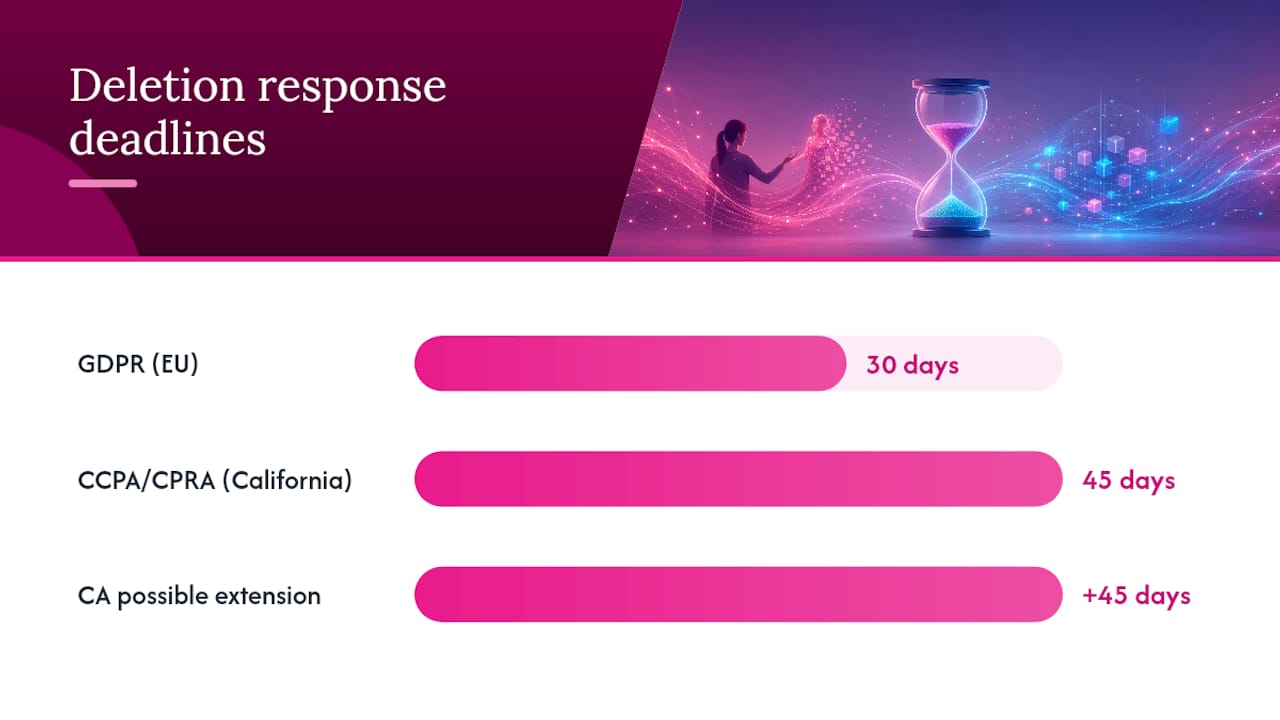
Under the GDPR’s Right to Erasure, companies are generally expected to act on a deletion request within 30 days, though this covers the formal legal request process rather than every backend system syncing instantly. That’s a compliance deadline for responding to your request, not a guarantee every server, replica, and cold backup is scrubbed the same day.
This gap matters most if you need fast, verifiable erasure, say, you’re dealing with a stalker situation, a custody dispute, or simply want a clean break before a job search. If speed matters, export everything you want to keep before you submit any deletion request, then submit the account deletion and a formal data request in the same sitting so you’re not waiting on two separate clocks. Chaining requests, rather than deleting the account first and thinking about formal erasure later, shaves real time off the total process.
What Legal Rights Do You Have to Force Deletion?
You have more leverage than the in-app “delete account” button suggests, provided you invoke the right law for where you live.
Under the GDPR, Article 17 gives EU residents (and, in practice, anyone whose data an EU-serving company processes) a legal Right to Erasure. A company must delete your personal data on request and instruct any processors, the cloud vendors and analytics tools handling your data behind the scenes, to do the same. Compliance is generally expected within 30 days, and this is one of the few deletion mechanisms with real regulatory teeth behind it.
In the United States, CCPA/CPRA gives California residents a comparable deletion right, though the federal landscape is patchier outside California. California businesses generally have 45 days to respond to a verified deletion request, with a possible 45-day extension for complex cases. The FTC’s privacy and security guidance doesn’t create a blanket federal deletion right, but it does set baseline expectations around data minimization and reasonable deletion practices that regulators use to evaluate whether a company’s behavior is deceptive or unfair.
Here’s how to actually file a request that gets taken seriously:
- Identify yourself clearly. Use the email or account ID tied to your subscription, and be ready to provide a photo ID if the platform requires identity verification (a legitimate anti-fraud step, not a stall tactic).
- State the legal basis explicitly. Reference GDPR Article 17 or CCPA/CPRA by name, even if you’re not certain which applies. It signals you know your rights.
- Define the scope precisely. Ask for deletion of account data, conversation logs, memory summaries, and any data shared with processors or subprocessors, by name if you know them.
- Request processor notification. Explicitly ask the company to confirm it has instructed any third-party processors to delete your data too.
- Ask for written confirmation. Request a deletion receipt or confirmation email with a timestamp, this becomes your evidence if the company later fails to comply.
If the company ignores you or gives a vague non-answer, escalate. In the EU, file a complaint with your national data protection authority. In California, the California Privacy Protection Agency accepts consumer complaints.
Pro Tip: Send your deletion request from the email address on file and keep a dated copy of everything you send. If you ever need to escalate to a regulator, a paper trail beats a memory of “I asked them to delete it.”
Can You Actually Remove Your Data From a Trained AI Model?
Not with anything close to certainty, not yet, at least not through a consumer-facing button.
Once your conversations contribute to training or fine-tuning a model, that influence is distributed across millions of parameters rather than sitting in one identifiable file. Deleting the original messages doesn’t reverse the training process, because the model doesn’t “remember” your specific words, it absorbed statistical patterns from them. Academic work on deletion as an algorithmic problem has treated this as an open engineering challenge for years, precisely because naive deletion (just removing the source data going forward) doesn’t touch what’s already baked into a model that trained on it.
That said, the research is moving faster than most people realize.
- Researchers at UC Riverside built a source-free certified unlearning method that can remove targeted private data from a trained model without a full retrain, and it’s been validated on smaller models with mathematically provable erasure guarantees. It’s a real technical breakthrough, and UCR’s own reporting is candid that scaling it to today’s largest consumer models is still in progress.
- Open-source frameworks like Erasus offer practical toolkits for surgically removing specific concepts or training samples from foundation models, complete with certified-removal metrics and support for multiple model types, without the enormous cost of retraining from scratch. You can review the project’s approach on GitHub.
- Methods using saliency-scored distillation, sometimes referred to in the literature as PECKER, along with other certified-erasure techniques, reduce the computing cost of unlearning compared to full retraining, but they currently target research and enterprise systems, not the app on your phone.
Machine unlearning is one of the more misunderstood terms in AI privacy. It sounds like a delete button for neural networks. In practice, it’s closer to expensive, partial surgery than a database DELETE command, and even researchers building certified methods describe the field as promising rather than solved for large-scale consumer systems, as Harvard Business School’s AI Institute has noted.
What this means practically: if a companion app tells you your data has been “removed from our AI,” ask what that means specifically. Removed from future training runs? Removed from the currently deployed model’s weights? Those are very different claims, and only the first one is something most platforms can honestly promise today.
Why Does Deleted Data Sometimes Resurface Anyway?
Because “delete” on your screen and “delete” on a server are not the same operation, and the gap between them is where recoverable data lives.
On the device side, forensic researchers looking at AI companion apps have repeatedly found that deleted conversations leave behind recoverable fragments. SQLite Write-Ahead Log (WAL) files, crash-reporting tools like Crashlytics, and cached authentication tokens can all retain fragments of your activity even after the app says the data is gone. A DFRWS forensic evaluation of AI companion applications documented exactly this pattern across multiple apps, along with meaningful differences in how thoroughly each app scrubbed server-side data compared to what it claimed in its privacy policy.
The common culprits worth knowing about:
- SQLite WAL files. Databases often write changes to a temporary log before committing them, and that log can retain deleted rows longer than the main database file suggests.
- Crash and diagnostic logs. Tools that capture app crashes for debugging frequently snapshot recent user activity, including message content, independent of your deletion request.
- Cached tokens and session data. Authentication tokens and cached previews can sit in local storage well after you’ve logged out or deleted your account.
- Server-side replication. Data replicated across multiple servers for reliability doesn’t always get purged from every replica the moment a deletion request is processed.
App architecture and encryption practices change how exposed this residual data actually is. An app that encrypts local storage with a key tied to your device makes those SQLite fragments far less useful to anyone who recovers them. An app that stores everything in plain text locally, or that keeps unencrypted crash logs on a third-party analytics server, is a much bigger practical risk even after you’ve followed every deletion step correctly.
If you’re wiping a shared or resold device, don’t rely on app-level deletion alone. A full device factory reset, combined with confirming the app supports encrypted local storage, closes most of the gap that in-app deletion leaves open.

Your Step-by-Step Deletion Checklist
Follow this in order. Skipping the export step is the single most common regret people report after realizing they wanted a screenshot or transcript months later.
Before you delete anything:
- Export your data. Most platforms offer a data export or download tool in account settings. Use it, even if you never plan to look at the file again.
- Screenshot your settings and memory profile. If the app shows you what it “remembers” about you, capture that screen. It’s your proof of what existed if a dispute arises later.
- Note your account ID and the email tied to it. You’ll need this for any formal legal request.
During the deletion flow:
- Delete memory objects first, if the option exists separately. Some apps let you clear long-term memory or personality profiles independent of the account itself; do that before closing the account, since account closure sometimes locks you out of granular controls.
- Cancel billing separately. Deleting an account doesn’t always cancel an active subscription automatically, check your payment method’s subscription list too, not just the app.
- Then delete the account itself.
If you want legal-grade erasure, not just app-level deletion:
- Send a formal GDPR or CCPA-style deletion request by email, referencing the specific right by name and including your account ID.
- Explicitly ask the company to confirm it has notified its processors (cloud hosts, analytics vendors, customer-support platforms) to delete your data as well.
- Request written confirmation of completion, ideally with a timestamp and a description of what was deleted.
After you believe deletion is complete:
- Check your device’s local storage for leftover app data, particularly if you’re on Android where apps sometimes retain cache folders after uninstall.
- Watch your email and account activity for 60 to 90 days to see if anything resurfaces, a resumed subscription charge, a “we miss you” email referencing specifics only your old memory profile would know, and so on.
Pro Tip: If you plan to try a different AI companion afterward, do the export and delete process for the old one entirely before creating the new account. Running both simultaneously makes it much harder to tell whether a “personalized” suggestion from the new app is a coincidence or evidence the old data leaked somewhere.
How Do You Spot a Provider’s Empty Privacy Promises?
Read the retention section of a privacy policy before you read the pricing page. It tells you more about what happens when you leave than any marketing claim about “military-grade encryption” ever will.
Look for specific, checkable language rather than vague reassurance. A policy that says the company instructs its data processors to delete your information on request, the way Replika’s privacy policy spells out, gives you something concrete to point to if deletion doesn’t happen. A policy that just says “we take your privacy seriously” gives you nothing to enforce.
Concrete things to check in any provider’s settings and policy pages:
- A separate memory or personality toggle, distinct from account deletion, that lets you clear what the AI has learned about you without nuking the whole account.
- A real export tool that produces a usable file, not just a support ticket you have to file and wait on.
- A named contact for privacy requests, ideally a Data Protection Officer or an equivalent, not a generic support inbox that also handles billing complaints.
- An explicit training-use opt-out, stated in plain language, not buried in a clause that only a lawyer would parse correctly.
- A stated retention window with actual numbers, “30 days,” “90 days,” not “as long as necessary for business purposes.”
Red flags worth walking away from entirely: a terms-of-service clause granting the company a perpetual, irrevocable license to your content (this means deletion may never fully apply to what you already sent), a retention policy with no numbers at all, or no way to reach a human about a privacy request beyond a contact form that never gets a response.
| Signal | What it means |
|---|---|
| Named DPO or privacy contact | Company treats requests as a real process, not a formality |
| Perpetual content license in ToS | Deletion may not apply retroactively to past messages |
| Numeric retention window stated | You can hold the company accountable to a specific timeline |
| Memory toggle separate from account deletion | You can clear personalization without losing the account entirely |
How Virtualship.ai Evaluates Deletion and Privacy Practices
Deletion behavior isn’t a footnote in a review, it’s one of the criteria Virtualship weighs when ranking AI companion platforms, alongside personalization depth and pricing transparency.
The review process combines three checks: reading the actual privacy policy for processor obligations and retention numbers, walking through the in-app deletion flow to see what disappears immediately versus what requires a separate request, and checking whether a platform’s support channel actually responds to a privacy inquiry within a reasonable window. A platform that talks a good game about privacy but buries its deletion tools three menus deep gets flagged in the comparison, not just the marketing copy taken at face value.
That combination, policy language plus hands-on testing, is why deletion practices show up as a scored factor rather than an afterthought:
- Whether memory/personality data can be cleared separately from the account
- Whether the export tool actually produces a usable file
- Whether the privacy policy states numeric retention windows or just vague language
- Whether support responds to a real deletion inquiry within a reasonable window
If you’re choosing a new AI companion and want to see how deletion and privacy features stack up before you commit, the platform comparison breaks these details out by provider.
When Is It Better to Just Start Fresh?
Full model-level erasure, the kind that would guarantee your specific conversations never influenced any weight in any model anywhere, isn’t something you can currently buy or demand with certainty. That’s a hard limit of the technology, not a failure of any one company’s customer service.
So the real decision most people face isn’t “how do I get perfect erasure.” It’s “what am I actually trying to accomplish.” If you want emotional closure, a clean break from a companion relationship that ran its course, exporting your conversation history and deleting the account covers that need completely. You don’t need certified unlearning for a breakup with a chatbot.
Legal-grade erasure requests matter more when there’s a concrete risk: a shared device, a job search where a background check might surface unexpected accounts, a relationship where a partner has access to your phone. In those cases, file the formal GDPR or CCPA request even knowing it won’t touch training data, because it will handle the layers that actually matter for your situation.
Set the boundary before you sign up for the next one: read the memory and retention settings first, this time, not after you’ve already overshared.
Choosing a Privacy-Conscious AI Companion With Virtualship
If the deletion checklist above left you wanting a companion platform that doesn’t make you fight for basic privacy controls, that’s exactly the gap Virtualship exists to close. Rather than guessing from marketing pages which app actually lets you clear memory separately from your account, or which one buries its retention window in legal boilerplate, Virtualship reviews these details directly, alongside personalization, pricing, and NSFW/roleplay options, so you can compare privacy practices the same way you’d compare features.

The comparison page breaks down memory controls, export tools, and stated retention windows across the platforms readers ask about most, so you’re not relying on a single privacy policy paragraph to make the call. If you’re planning to close out an old companion account and start somewhere new, check the comparison before you sign up. It’s a faster way to find a platform whose deletion practices match what you actually expect, rather than discovering the gap after you’ve already built six months of memory into a new account.
Sources
- Regulation (EU) 2016/679 (GDPR)
- UCR pioneers way to remove private data from AI models | UCR News
- ERASUS — Machine unlearning framework (GitHub)
- FTC — Privacy & Security Guidance

