

Janitor AI’s default model, JLLM, works with a context window of roughly 8,000 to 9,000 tokens, according to Janitor AI’s own help center. That is the whole memory limit. Everything the bot “knows” in a given reply has to fit in that space: its character definition, your persona, your Chat Memory notes and the most recent messages. When the space fills up, the oldest messages fall out. This guide explains what that means in practice, what eats your budget, and how to stretch it.
TL;DR
- JLLM’s budget is about 8,000 to 9,000 tokens, which is on the order of 6,000 to 7,000 words of text in total, and it is shared by everything the bot reads.
- There is no cap on how many chats you can have or how long one chat can run. The limit is on what the bot can see at once, so old messages quietly drop out.
- Permanent inputs (character definition, scenario, persona, Chat Memory) come off the top. A bloated bot leaves less room for the conversation.
- Short, structured Chat Memory notes are the best fix. Keep them tight, because every note you add costs room.
- Proxy setups can offer larger, configurable windows, but a bigger window is not the same as better recall.
Table of Contents
- What the memory limit actually is
- Is there a limit to Janitor AI chats?
- What fills the budget before you say a word
- Why Janitor AI keeps forgetting things
- Do Janitor AI bots have good memory?
- How to use Chat Memory properly
- Keep the permanent text lean
- A simple routine for long stories
- Can you get a bigger window?
- Memory and privacy go together
- Find a companion whose memory fits how you chat
- FAQ
- Sources
What the memory limit actually is
People search for a “memory limit” as if Janitor AI stores a fixed number of messages and then stops. It doesn’t work that way. The limit is the context window: the amount of text the model can read each time it writes a reply. It is measured in tokens, which are chunks of text, not words.
Janitor AI’s help center gives a rule of thumb that JLLM’s token budget often holds 8,000 to 9,000 tokens. As a rough conversion, a token is about three-quarters of a word in English, so that budget is a few thousand words, about the length of a long magazine article. The exact figure can shift, and the help center points users to the Janitor Discord for current numbers.
Two things follow from this:
- The chat itself isn’t deleted. You can scroll back and read message one of a 500-message chat. The bot just can’t read it anymore when it writes the next reply.
- Nothing warns you. Janitor AI says that when the limit is reached, the system may silently remove older conversation content instead of showing an error. You find out when the bot gets your name wrong.
Is there a limit to Janitor AI chats?
Not on the number of chats as far as Janitor AI’s help pages describe, and the sources behind this article don’t point to a hard cap on chat length either. What you hit is the context window. A chat can run for thousands of messages; the bot simply works from a sliding slice of the latest ones plus whatever permanent text is attached to it.
That is also the answer to “does Janitor AI have no limits?” It has no obvious limit on how long you can keep talking, but it very much has a limit on what the bot can hold in mind at one time. If a platform page or a video claims “unlimited memory,” read it as “unlimited chat length,” which is a different thing.
What fills the budget before you say a word
The token budget is split between two kinds of input, and the split explains most forgetting complaints.
Permanent inputs are sent with every single reply. Janitor AI lists them as Chat Memory, the bot’s personality or prompt, the scenario and Advanced Prompts. These never get pushed out.
Temporary inputs are the messages you and the bot exchange. As new ones arrive, older ones are pushed out.
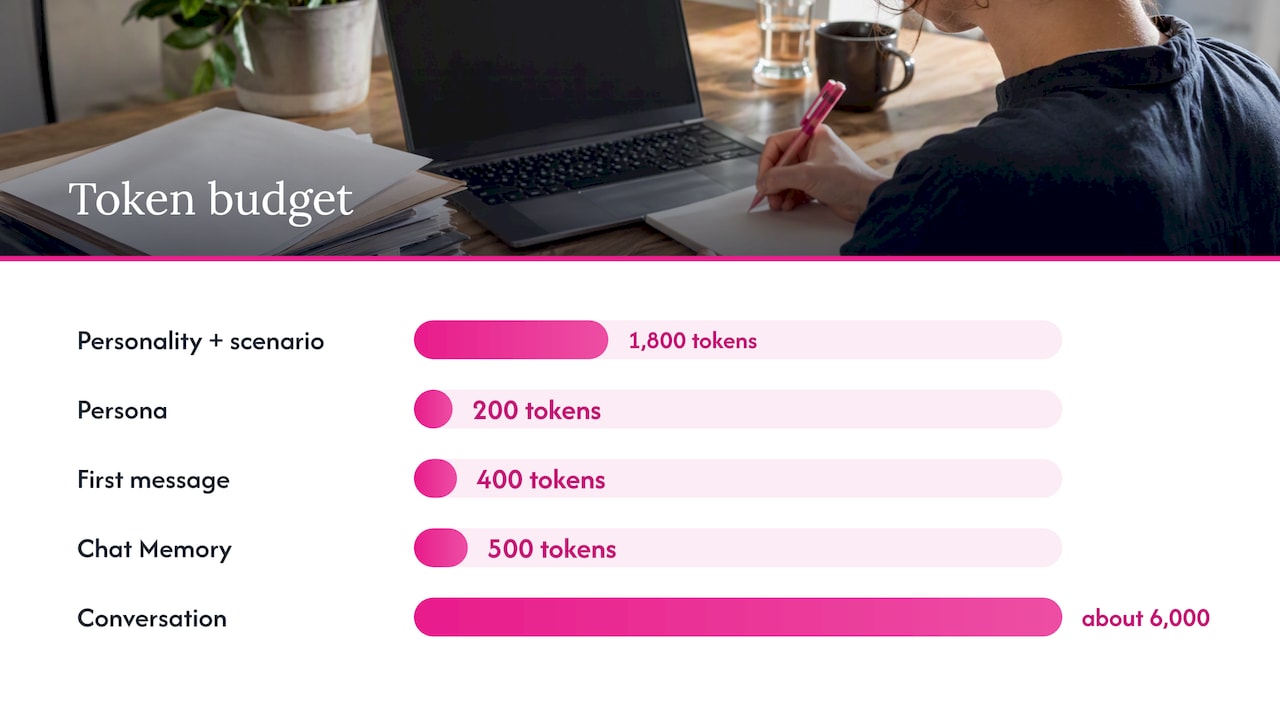
The consequence is simple arithmetic. A community guide hosted on Janitor AI walks through it: a 9,000-token JLLM window gets reduced by the bot definition, your persona, any custom prompt, Chat Memory and the bot’s first message before ordinary conversation is counted at all.
Here is an illustrative budget (the numbers are examples, not measurements from any specific bot):
| Item | Example tokens | Type |
|---|---|---|
| Bot personality and scenario | 1,800 | Permanent |
| Your persona | 200 | Permanent |
| First message | 400 | Permanent |
| Chat Memory notes | 500 | Permanent |
| Left for conversation | about 6,000 | Temporary |
Six thousand tokens of conversation is maybe 15 to 25 exchanges, depending on how long your messages and the bot’s replies are. If you write long, descriptive roleplay turns, it can be fewer. Janitor AI also says that larger permanent prompts leave less room for the active conversation, so an elaborate character with a 3,000-token backstory forgets sooner than a lean one.
Why Janitor AI keeps forgetting things
When the window overflows, Janitor AI says the bot may lose track of who you are, what you were doing, or the tone of the conversation. In practice you will notice:
- Names or relationships change mid-scene.
- A location you established ten scenes ago is gone.
- The bot’s personality drifts toward generic.
- A promise, injury or secret is ignored.
The help center calls the degraded state context rot, and it describes the effect of overloading the window as information being pushed out or beginning to degrade. So the forgetting isn’t a bug in one reply. It is the predictable result of a fixed-size window and a growing chat.
If you are comparing how this plays out on other roleplay apps, our guide to what actually gets forgotten on a rival platform covers the same mechanism from a different angle.
Do Janitor AI bots have good memory?
Good for a scene, weak for a saga. Within the last few thousand tokens, a bot follows details well. Across weeks of daily chatting, it will only “remember” what you have put into permanent inputs or what happens to still sit inside the window.
Set expectations like this:
| What you want remembered | Will it survive? |
|---|---|
| What was said in the last 10 to 20 messages | Usually yes |
| Your name and basic relationship, if in persona or Chat Memory | Yes, as long as it is written down |
| A small detail from 100 messages ago | Probably not, unless you noted it |
| The mood and slow-burn buildup of an early chapter | Fades, unless summarized |
If you want a deeper look at keeping a companion consistent over weeks, we break it down in five memory details that keep AI companion chats consistent.
How to use Chat Memory properly
Chat Memory is your main lever, because it is permanent. Janitor AI recommends keeping it short, clear, structured and focused on what matters to the current story. Treat it like a notepad, not a diary.
A sound structure covers:
- Environment: where the story is happening right now.
- Relationship dynamic: how the characters currently stand with each other.
- Current plot points: what is unresolved.
- Character and user notes: facts that must not change.
- Important past events: only the ones that still matter.
A worked example
Weak entry (too long, too vague):
We went to the lake and talked a lot about our feelings and it was a really emotional day and then we came home and she was sad.
Stronger entry (about 25 tokens):
Day 12: At the lake cabin, Mara admitted she is afraid of being left. {{user}} promised to stay. Mara now wears his jacket.
The second version keeps the facts a future reply would need: who, what was promised, what changed. Write entries in the order events happened, short and specific, and delete notes that no longer matter. Every line you keep permanently costs space in every future reply.
Using auto-summaries
The fastest route is the built-in flow: roleplay for a while, open the chat options, tap the Chat Memory button, run the auto summary and save it. Read what it produced before saving. Summaries can drop the emotional beat or misread who did what, and a wrong summary is worse than no summary because it is permanent.
One change worth knowing about: Janitor AI’s August 2026 changelog says an experiment had caused saved summaries to replace the old messages they covered. The default was restored so memory is added without removing messages, unless you turn on the replacement option. If you do enable replacement, you are choosing to trade raw message history for a compact summary. That can save tokens, but the model then sees only your summary for that stretch, so the summary must be accurate.
Keep the permanent text lean
If Chat Memory is the lever, the bot definition is the weight. A few habits help:
- Trim the bot’s backstory. Long lore sections you never reference still cost tokens on every turn.
- Keep your persona short. Name, age, one or two traits, and anything the bot must always know.
- Cut the repetition. If the scenario already says she is a ship’s engineer, the memory doesn’t need to say it again.
- Avoid greeting messages that are essays. The first message is permanent in the budget calculation above, so a 600-word opener is expensive.
Before you invest weeks in a bot, open its definition and see how long it is. A beautifully written 4,000-token character is a bot that will forget your story quickly on a 9,000-token window.
A simple routine for long stories
This is a workable rhythm for a story you want to last:
- Every 15 to 20 exchanges, glance at whether the bot still has names, place and mood right.
- At each scene break, add one or two lines to Chat Memory: what changed, what was promised.
- Once a chapter, reread Chat Memory and delete anything stale.
- When the bot slips, don’t argue with it for ten messages. Fix it with a short correction, then add the fact to Chat Memory so the correction survives.
The habit matters more than the tool. For a daily-chat version of the same idea, see our short routines that build companion memory.
Can you get a bigger window?
On JLLM, the window is what it is. Users who connect an outside model through a proxy or API can often choose a larger context size. A Janitor AI-hosted community guide gives 16,000, 32,000 and 64,000 tokens as examples of what proxy users may configure.
Three cautions before you chase a bigger number:
- Bigger isn’t automatically better. Janitor AI’s own guidance stresses that stuffing more in degrades results, and a long window full of clutter can still produce muddled replies.
- The actual limit depends on the model and settings. What you can use varies by provider and what you configure, so don’t assume one universal number.
- Outside models can cost money and bring their own rules. Check the provider’s pricing and terms before you connect it.
If the limit itself is the dealbreaker, it may be worth looking at whether a different app’s memory design suits you better. Our Janitor AI alternatives for roleplay guide compares how other apps handle continuity, and the shortlist of AI chatbots with memory for romance focuses on that one feature.
Memory and privacy go together
The more you put into permanent notes, the more personal detail sits attached to a chat. Write Chat Memory as you would write a note someone else might read: use fictional details for sensitive things and keep real names, addresses and workplaces out. Our look at Janitor AI safety and the risks that remain goes through what to consider before sharing personal information with any companion app.
Find a companion whose memory fits how you chat
Memory handling differs a lot between apps: some lean on long context, some on saved facts, some on both, and some forget fast. If you are weighing options, we review AI companion platforms on memory, customization, roleplay options, privacy and pricing, with notes from hands-on use. Start with the AI companion platform comparison to see how they line up, and pick based on how long and how detailed your conversations usually run.
FAQ
What is the Janitor AI memory limit?
For the default JLLM model, Janitor AI’s help pages describe a context window of around 8,000 to 9,000 tokens. That space is shared by the bot’s definition, your persona, Chat Memory and recent messages. The exact figure can change, so check Janitor AI’s help center or Discord for the current number.
Is there a limit to how many Janitor AI chats I can have?
The help pages this article draws on describe a limit on what the bot can see at once, not on how many chats or messages you can have. Your chat history stays readable to you, but older messages stop reaching the model once the window fills. If you want a specific detail to last, put it in Chat Memory.
Why does my Janitor AI bot forget my name or the plot?
Because the window overflowed and older messages were pushed out. Janitor AI says this can make the bot lose track of who you are, what you were doing or the tone of the chat. Add short, structured notes to Chat Memory and keep the bot’s definition lean.
Does a longer Chat Memory help?
No. Chat Memory is permanent, so every extra line takes room from the live conversation on every reply. Janitor AI recommends short, clear, structured notes. A tight page of facts beats a long narrative.
Can I increase the memory limit?
On JLLM, not in any way the help pages describe. People who connect an outside model through a proxy may be able to set a larger context, with examples of 16,000 to 64,000 tokens, but results and costs depend on the model and your settings.
Sources
- Chat Memory & Context Management, Janitor AI help center
- Tokens: Your AI’s Memory Budget, Janitor AI help center
- Changelog, Janitor AI newsroom
- CHAT MEMORY! user guide, hosted on Janitor AI

