

A web-only AI companion is a chatbot or virtual partner you access entirely through a browser, no app store, no install, no update prompts. If you want casual conversation or light roleplay, a text-first companion with optional voice covers most needs; if you want deeper immersion, look for voice or video support. Start with whichever platform’s free tier lets you test your top priorities before you pay for anything.
TL;DR:
- Most web-only AI companions are limited by memory, with persistent recall across sessions often requiring paid tiers or specific storage setups.
- Voice and video features can introduce latency and reduce naturalness, especially on mobile devices where permissions and hardware limitations impact performance.
- User privacy depends heavily on platform policies regarding data retention, sharing, encryption, and deletion options, making thorough policy review essential before sharing personal information.
- Compatibility with other apps and browser tools varies; companions may not integrate seamlessly with calendars, email, or notifications without explicit, tested features.
- Customer support and community engagement are indicator of platform reliability; accessible support channels and active user forums generally suggest a more trustworthy companion service.
Table of Contents
- Web Only AI Companion Comparison: What Actually Matters
- How Do You Judge Memory, Voice, and Pricing in a Trial?
- What Should You Verify Before You Pay or Share Personal Data?
- How Do You Test a Web-Only AI Companion in One Session?
- Does It Work With Your Other Apps and Browser Tools?
- What Support and Community Options Should You Expect?
- Does It Perform the Same on Phone and Desktop?
- Where to Start: Curated Comparisons and Safety Checks From Virtualship
- Sources
- FAQ
Web Only AI Companion Comparison: What Actually Matters
Testing a companion by gut feeling gets you nowhere. You need a checklist you run the same way every time, so one platform’s polished landing page doesn’t fool you into skipping the boring parts.
Here are the seven dimensions worth checking, and a one-line test for each:
- Web access: Does everything work without installing anything, even on a work laptop with restricted permissions? Test: open the site in an incognito window and see how far you get before it demands a download.
- Memory persistence: Does it remember what you said ten minutes ago, or ten sessions ago? Test: mention a preference early, then bring it up again later without repeating it.
- Conversation modes: Text only, or voice and video too? Test: switch modes mid-conversation and see if the personality holds.
- Customization: Can you shape personality, backstory, and roleplay tone, or just pick a name and photo? Test: try to change one core trait and see how far the edit actually goes.
- Privacy controls: Can you delete your data, and does the platform say what it does with it? Test: find the privacy policy in under 30 seconds.
- Pricing model: Free tier, message caps, or a flat subscription? Test: try to hit a paywall on purpose to see what triggers it.
- NSFW/roleplay support: Is there an explicit content policy, or vague hand waving? Test: search the terms page for the word “content” and read what comes up.
Run through all seven before you commit a dollar. Most platforms fail on at least one.
How Do You Judge Memory, Voice, and Pricing in a Trial?
Memory is the feature most companions oversell. There’s a real difference between session memory, where the bot only remembers what you said in the current window, and long-term memory, where it recalls details across days or weeks. Some platforms marketed as web-native use browser-based storage rather than a server-side profile, which means memory can vanish if you clear cookies or switch devices. Some products explicitly separate free anonymous sessions from paid tiers that unlock saved memory and personalization, so check which bucket you’re in before assuming anything sticks.
A meaningful memory test looks like this: mention your job, your favorite hobby, and a nickname you’d like used. Come back twenty minutes later and see how many of the three survive without a reminder. One out of three is weak. Three out of three, unprompted, is a real signal.
Voice and video introduce a different set of problems: latency and naturalness. A half-second delay between your sentence and the reply breaks immersion fast, and a lot of “voice” features are just text-to-speech bolted onto a chat engine rather than a natural conversational voice model. Check whether the platform asks for microphone or camera permission upfront and what happens if you deny it, since a companion that breaks entirely without camera access is telling you it wasn’t really designed as text-first.
Customization ranges from a few sliders (playful, shy, dominant) to full backstory scripting where you write a character bio the AI is expected to follow. Test it by giving the companion an unusual trait, like a fear of heights or a specific speech quirk, then check three exchanges later if it’s still there.
NSFW and roleplay handling varies enormously between platforms, and the policy language is often buried. Look specifically for a content policy page rather than trusting marketing copy, since some narrative-style web companions build in progressive interaction levels that only unlock certain content after trust or subscription thresholds.
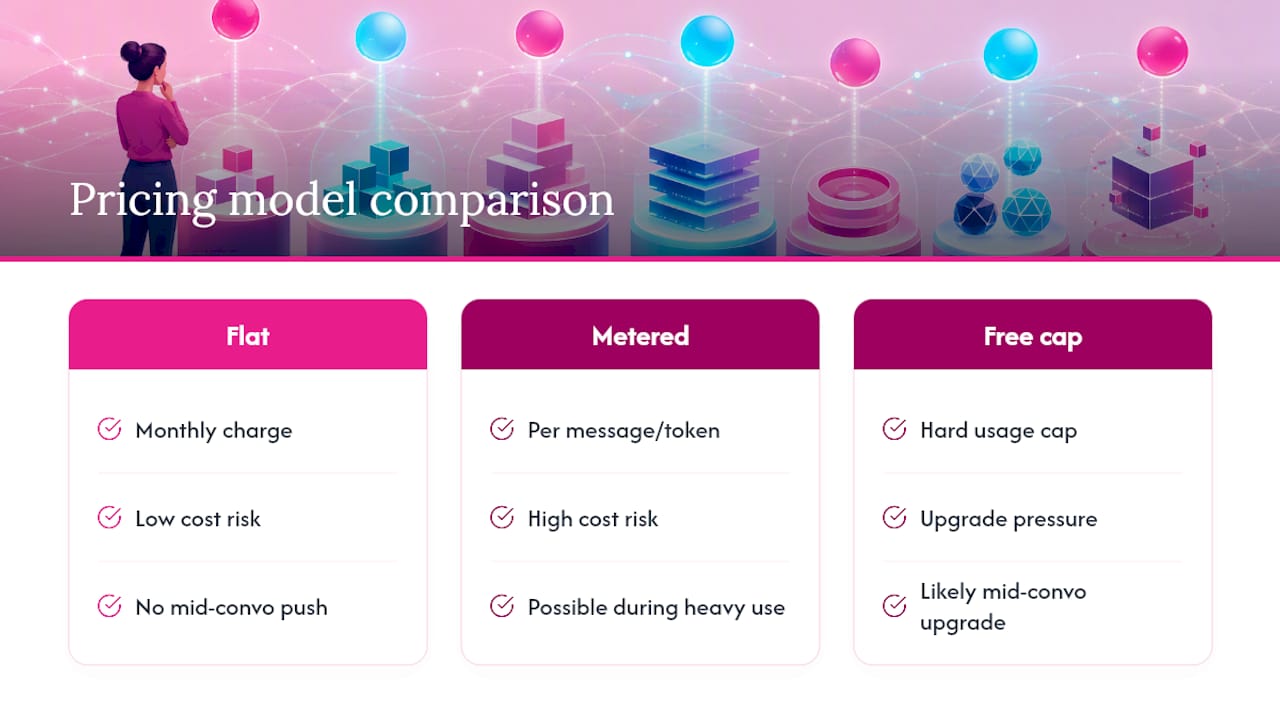
Pricing tends to follow one of three shapes: a flat monthly subscription, a metered system charging by message count or token usage, or a free tier with a hard cap that pushes you toward upgrading mid-conversation. None of these pricing models is inherently better, but a metered system can get expensive fast if you’re a heavy texter, so check the cap before you get attached to a character.
What Should You Verify Before You Pay or Share Personal Data?
Before you hand over a credit card or start telling a companion anything personal, run through this checklist. It takes five minutes and it will save you from a bad surprise later.
- Data retention: Does the privacy policy state how long conversations are stored, and can you request deletion?
- Third-party sharing: Does the policy disclose whether conversation data is shared with advertisers or analytics partners?
- Encryption: Is data encrypted in transit (TLS, the padlock in your browser bar) and, ideally, at rest? Few companion apps offer true end-to-end encryption, since the AI itself needs to read your messages to respond, so treat “end-to-end encrypted” claims with skepticism.
- Moderation visibility: If content gets flagged, does a human moderator see the conversation, or is it automated?
- Account controls: Can you use an anonymous or demo mode, and does the platform let you export or fully delete your history?
Pro Tip: Search the privacy policy for the word “delete” before you sign up. If it doesn’t appear anywhere, that’s your answer about how seriously the platform treats data removal.
Red flags worth walking away from: a privacy policy that’s vague about retention periods, a signup flow that demands ID verification with no stated reason, no visible deletion option anywhere in account settings, and payment or refund terms that are hard to find or written in a way that discourages you from reading them. Virtualship’s own safety checklist walks through these checks in more depth if you want a second pass before subscribing.
How Do You Test a Web-Only AI Companion in One Session?
You don’t need a week to know if a companion is worth your money. Here’s a test plan that takes 20 to 30 minutes and gives you comparable results across platforms.
- Open an anonymous or demo session first. Note how the companion greets you and whether it asks for personal information before you’ve said a word.
- Run a three-point memory check. Mention a detail early (your name, a hobby, a preference), continue chatting for ten minutes, then ask a question that would only make sense if it remembered.
- Try a ten-minute roleplay scenario. Pick something specific, a coffee shop meeting or a fictional adventure, and watch whether the character stays consistent or drifts into generic responses.
- Check privacy and pricing in the same sitting. Look for the delete option, skim the privacy policy, and note exactly what triggers the paywall.
- Score it against the seven-point framework from the comparison section above.
Write your scores down somewhere, even a rough note on your phone. After testing two or three platforms, the differences that felt vague in the moment become obvious on paper.
Does It Work With Your Other Apps and Browser Tools?
Most web-only companions live in their own isolated tab, but a few are starting to blur that line. Major browser assistants, including Google’s Gemini, are built to work across email, search, and browsing context rather than staying in a single chat window, which sets a rising expectation for what “integrated” can mean even in the companion space.
Companion platforms rarely go that far, and that’s mostly fine. What matters more practically is whether the platform plays nicely with your existing setup: does it work in your default browser without extensions, does it support browser notifications for proactive messages, and does switching between your phone and laptop lose any context? Some platforms build in multi-character rooms or proactive messaging that pushes notifications the way a messaging app would, which is a meaningfully different experience from a companion that only responds when you open the tab.
If a companion promises calendar sync, journal integration, or connection to other apps, treat those claims the way you’d treat memory claims: test them directly rather than trusting the feature list. A surprising number of “integration” features turn out to be a single button that opens another tab.
What Support and Community Options Should You Expect?
Customer support quality varies wildly across this category, and it’s rarely mentioned until something goes wrong, like a billing issue or a character that suddenly stops responding the way it used to.
Before subscribing, check whether the platform has a visible support channel: an email address, a ticket system, or at minimum an FAQ page that answers billing and cancellation questions clearly. A platform that hides its support contact behind a login wall is telling you something about how much it wants to hear from you after you’ve paid.
Community features are a secondary signal worth checking too. Some platforms run Discord servers or forums where users share character templates, prompt ideas, and troubleshooting tips. A lively, moderated community usually means a team is paying attention, while a dead or unmoderated one is worth noting as a caution sign, especially if you plan to discuss customization or roleplay scripting where a genuine feedback loop matters more.
Does It Perform the Same on Phone and Desktop?
Web-only doesn’t mean identical everywhere. Browser-based companions can behave noticeably differently depending on the device and operating system running them, and this is one of the more overlooked parts of testing before you commit.
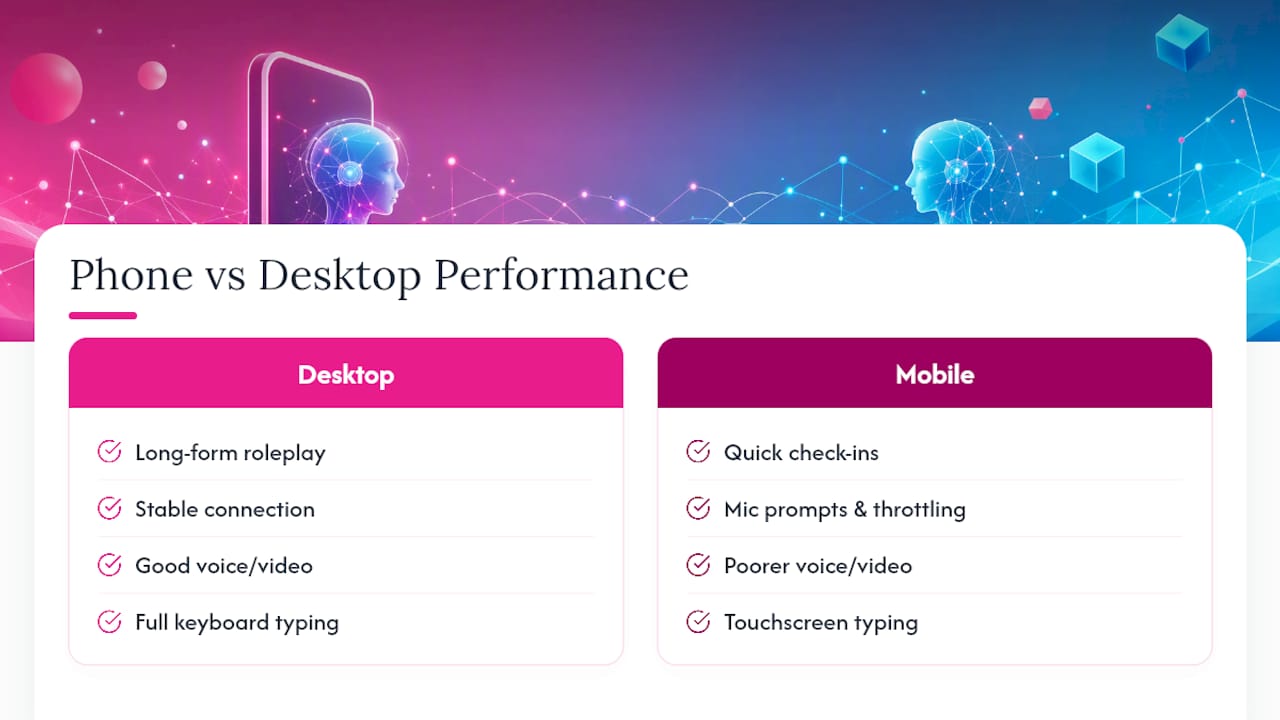
Voice and video features tend to suffer most on mobile, where microphone permission prompts, background app throttling, and smaller screens all introduce friction that desktop users never see. A companion that feels smooth and responsive on a laptop with a stable connection can lag noticeably on a phone browser, particularly on older Android devices or when running in a mobile browser tab that isn’t optimized for sustained audio streaming.
Desktop tends to win for long-form roleplay and typing-heavy sessions simply because a full keyboard beats a phone screen for extended writing. Mobile wins for quick check-ins and voice-first interactions, assuming the platform’s voice feature actually performs well on a phone connection. Test the same companion on both if you plan to use it in more than one context, since a platform that looks great in your desktop demo might disappoint the moment you try it on your commute.
Where to Start: Curated Comparisons and Safety Checks From Virtualship
Testing five platforms yourself takes hours you probably don’t have. There are curated shortlists that match what you’re looking for, based on thorough testing of leading web-based companion platforms.

Virtualship’s comparison page breaks down web access, memory depth, customization range, and pricing structure side by side, using the same seven-point framework covered above. If NSFW or roleplay support is your priority, the roleplay chatbot shortlist narrows things down further, and if long-term memory is what you care about most, the memory-focused comparison does the same for that specific feature. Before you enter payment details anywhere, run through Virtualship’s safety checklist so you know exactly what to look for in a privacy policy and what red flags mean walk away.
Start with the comparison page, pick two or three platforms that match your priorities, then use the test plan from this guide to confirm the fit before you subscribe to anything.
FAQ
What Makes a Companion “Web-Only” Instead of an App?
A web-only companion runs entirely in your browser with no app store download, while app-based competitors require installation and updates on your device.
Is a Free Web-Only AI Companion Safe to Use?
It depends on the platform’s privacy policy and data retention practices, not on whether it’s free; check for a clear deletion option and transport encryption before sharing personal details, and consult Virtualship’s safety checklist for the specific checks worth running.
Do Web-Only Companions Remember Past Conversations?
Some do and some don’t. Memory ranges from nothing beyond the current session to persistent recall across weeks, so test it directly with a three-point recall check rather than trusting the marketing description.
Can I Use a Web-Only AI Companion on My Phone?
Yes, but voice and video features often perform worse on mobile browsers due to microphone permissions and background throttling, so test the same platform on both desktop and mobile if you plan to switch between them.
How Do I Compare Pricing Across Different Platforms?
Look at whether pricing is a flat subscription, a metered system charging by message or token, or a capped free tier, and check Virtualship’s comparison page for pricing summaries across the leading web-based options.

