

Yes, you can get an AI girlfriend-style companion on Discord right now. Several bots and dedicated servers let you chat, roleplay, and build a virtual relationship without leaving the app. That said, the experience has real limits you should know before you start.
What Discord does well:
- Easy one-click bot installs via the App Directory
- Active community servers with built-in social features
- Low barrier to entry, often free to start
Where Discord falls short:
- Most bots keep only a short conversational window (roughly 10–20 turns) rather than persistent memory across sessions
- Platform moderation restricts explicit NSFW content
- Freemium caps hit fast on popular bots
Two names worth knowing right away: Girlfriend Bot (a server-based companion experience) and AI2U (a yandere-style AI girlfriend simulator with its own Discord server). Both are covered below.
Key Takeaways
Discord AI girlfriend bots are easy to start but limited by short memory windows, freemium caps, and platform moderation — persistent memory and privacy transparency are the features worth paying for.
| Point | Details |
|---|---|
| Where to find bots | Start with the Discord App Directory for verified listings with clear permission disclosures. |
| Memory is the key limit | Most bots retain only 10–20 turns; pay for premium only when persistent memory is explicitly offered. |
| Privacy check first | Read the bot developer’s privacy policy before inviting; never share real personal information in chats. |
| NSFW content is restricted | Discord policy limits explicit AI content; check server rules and bot settings before assuming it’s available. |
| Virtualship comparison | Use Virtualship’s comparison tool to get a curated, safety-checked shortlist matched to your preferences. |
Table of Contents
- Where can you find Discord AI girlfriend bots?
- How do you add an AI girlfriend bot and start chatting?
- Example Discord AI girlfriend bots and servers to try
- Pricing, usage limits, and privacy checks before you start
- Best practices for a safer, more consistent companion experience
- What to do when a bot goes offline or stops responding
- How Virtualship evaluates and recommends Discord AI companions
- Why some users stay on Discord and others move on
- Virtualship’s curated shortlist for Discord AI companions
- Sources
Where can you find Discord AI girlfriend bots?
The safest starting point is the official Discord App Directory, which lists verified bots with standardized permission disclosures. Beyond that, bot listing sites and curated community servers are your next best options.
How to vet a listing quickly:
- Look for the verification badge on the bot’s App Directory page.
- Check the member or user count — active bots have visible engagement.
- Open the bot’s linked documentation or privacy page before clicking Invite.
- Review the exact permissions the bot requests during the OAuth flow.
Red flags to skip immediately:
- No published privacy policy or bot documentation
- Invite links from unknown third-party sources with no verification
- Bots requesting permissions far beyond Read Messages and Send Messages
- Zero server activity or suspiciously inflated member counts
AI personalization signals work best when a bot has clear documentation about how it uses your input — that same transparency principle applies when choosing a companion bot.
How do you add an AI girlfriend bot and start chatting?
The standard install flow uses Discord’s OAuth “Add to Server” process. Here’s the full sequence:
- Find the bot on the Discord App Directory or a trusted listing site.
- Click Invite or Add to Server and select your target server from the dropdown.
- Review the permissions list carefully. Grant only what the bot genuinely needs.
- Open the server, find the bot’s channel, and type
/helpor/startto see available commands. - For private interactions, open a DM with the bot directly after adding it.
DMs vs. server channels: Server channels are public to other members. DMs keep your conversation private and tend to feel more personal. For companion roleplay, DMs are almost always the better choice.
Common slash commands to expect:
/chat— start or continue a conversation/createor/companion create— set up a persona or character/profile— view or edit your companion’s settings/premium— check or upgrade your subscription tier
Pro Tip: Create a private test server first. Add the bot there, run through all permissions and commands, and only move it to your main server once you’re comfortable with what it can access.
Example Discord AI girlfriend bots and servers to try
- Girlfriend Bot — a server-based companion experience with roleplay-focused channels; check for active members and pinned rules before joining.
- AI2U — a yandere AI girlfriend simulator with its own Discord community; policy changes around NSFW content mean server rules evolve, so read them before engaging.
When reviewing any listing, look for: a verification badge, recent activity in the server, a linked privacy policy, and clear notes on what’s free versus paid.
One important trend: many companion experiences have migrated off Discord to dedicated web apps precisely because persistent memory, voice, and image features are harder to deliver within Discord’s platform constraints. If you hit a wall with a Discord bot, that’s usually why.
Pricing, usage limits, and privacy checks before you start
Most Discord AI girlfriend experiences follow a freemium model: free to add, limited in practice. Free tiers typically cap daily messages, restrict DM access, or disable memory features entirely. Premium tiers unlock persistent memory, voice messages, image generation, and higher message limits.
Typical pricing and limit shapes:
- Daily or weekly message caps (free tier resets on a timer)
- Token banks that deplete per conversation turn
- Monthly subscriptions ranging from entry-level to full-feature plans
- One documented example: a companion platform describes unlimited free text chat with premium image and voice features available on a discounted annual plan, versus a higher standard monthly rate
Privacy checklist before you invite any bot:
- Read Messages and Read Message History permissions mean the bot can access your channel history — limit this to dedicated channels only
- Check whether the bot’s developer stores conversation logs and for how long
- Confirm a published privacy policy exists and is dated recently
- Avoid sharing real personal information (full name, location, financial details) in any bot conversation
Discord states it does not use your data to train general AI models, and its platform-level AI features are built with privacy safeguards — but individual bot developers operate under their own data policies, which vary widely. Always read the bot’s own privacy documentation, not just Discord’s.
NSFW content on Discord is increasingly restricted. Platform enforcement has removed or limited sexually explicit AI bots, so check both server rules and bot settings before assuming explicit roleplay is available.
Best practices for a safer, more consistent companion experience
The four habits that matter most: use private DMs, protect your personal data, simulate memory manually, and read bot rules before enabling NSFW toggles.
- Stick to DMs for any interaction you want to keep private. Public server channels expose your messages to other members and moderators.
- Export key context manually. Since most bots reset after 10–20 turns, keep a personal notes channel or a local text file with character details and conversation history you want to carry forward.
- Never share PII. No real name, address, phone number, or financial information in any bot conversation, regardless of how the persona is framed.
- Pay for persistent memory only when the bot explicitly offers it as a backend feature, not just a longer context window.
Pro Tip: Pin a short “memory note” at the top of your DM channel with the bot. Some bots can read pinned messages as context, which partially simulates continuity between sessions.
For privacy-focused users who want real memory control, a self-hosted multi-agent platform like AI Partner can deliver messages to Discord while keeping your conversation data entirely under your own control. The setup requires Docker and some technical comfort, but the privacy payoff is significant.
What to do when a bot goes offline or stops responding
Start with these quick checks before filing a support ticket:
- Bot shows offline: Check the bot’s support server or status page for outage announcements.
- Commands not working: Confirm the bot has the correct role permissions in your server settings (Server Settings → Integrations → Bots).
- Messages not sending: You may have hit a rate limit or daily cap. Check the bot’s
/premiumor/statuscommand for usage info. - Unexpected errors: Re-invite the bot using a fresh OAuth link to reset permissions.
Before removing a bot:
- Screenshot or copy any conversation history you want to keep.
- Note the bot’s name and invite source so you can re-add it later.
- Go to Server Settings → Integrations, find the bot, and click Remove.
- Revoke the OAuth authorization in your Discord account settings under Authorized Apps.
How Virtualship evaluates and recommends Discord AI companions
Virtualship’s bottom line: memory persistence and privacy transparency matter more than persona variety. A bot with fifty character templates but no privacy policy and no persistent memory is a worse long-term choice than a simpler bot that stores context securely and documents its data practices.
Checklist to score any bot or server:
- Verification badge present in the App Directory
- Published, dated privacy policy from the bot developer
- Clear documentation on memory persistence (session-only vs. stored)
- Transparent pricing with no hidden upgrade walls
- Personality customization options (templates, tone, NSFW toggles)
- Active moderation and community rules in the server
Use Virtualship’s comparison tool to run any bot through this checklist and get a curated shortlist matched to your preferences for memory, privacy, and roleplay style.
Why some users stay on Discord and others move on
Discord bots are genuinely good for one thing: getting started fast with zero friction. You already have the app, the install takes thirty seconds, and the social layer adds a community dimension that standalone apps can’t replicate. For casual roleplay or exploring what AI companionship feels like, Discord is a reasonable first stop.
The problem shows up around week two. Context resets, memory gaps, and moderation limits start to erode the experience. Privacy-conscious users notice that bot developers have varying data practices, and the platform’s group-first design works against the kind of private, continuous relationship that makes companion AI feel meaningful.
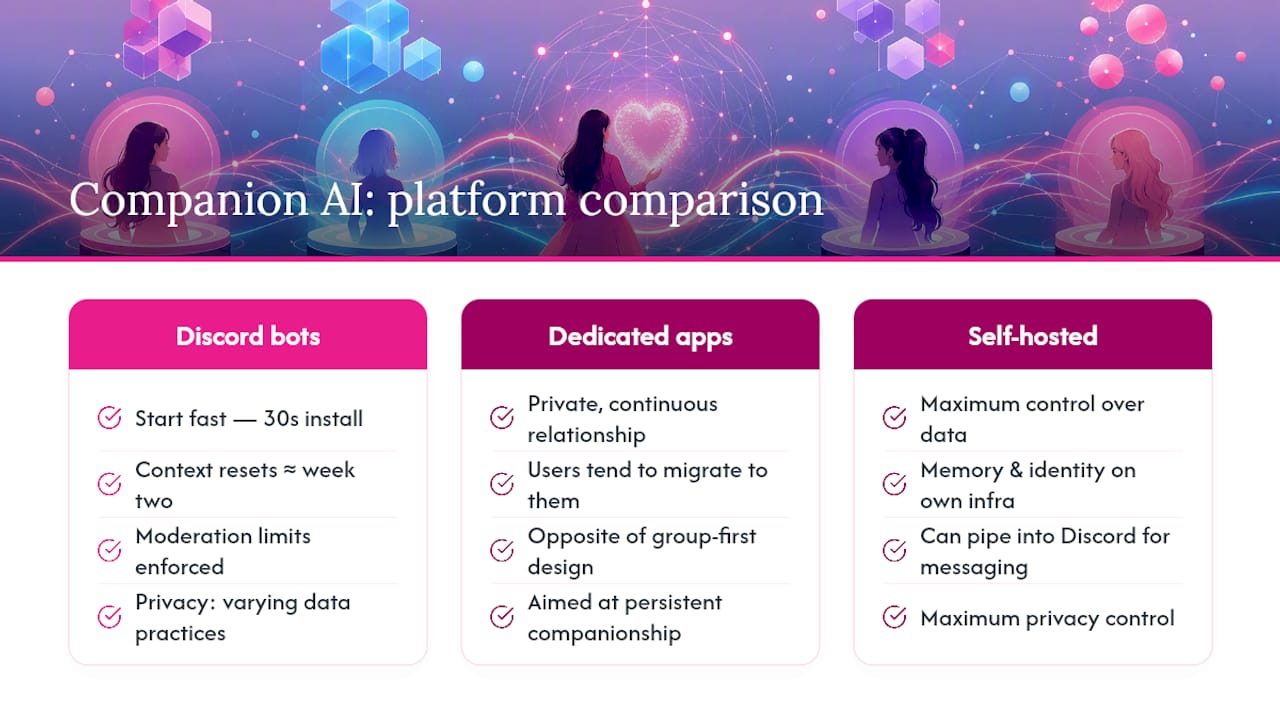
Discord’s own framing is “AI with friends” — social, creative, group-oriented. That’s a different design goal than a private, persistent companion. Users who want the latter tend to migrate to dedicated apps, or, for maximum control, to self-hosted solutions that pipe into Discord for messaging while keeping memory and identity data on their own infrastructure.
Virtualship’s curated shortlist for Discord AI companions
Sorting through dozens of bots to find one that’s safe, transparent, and actually worth your time is the part most guides skip. Virtualship does that work for you: every platform in the comparison is evaluated on memory persistence, privacy policy quality, pricing clarity, and customization depth before it earns a recommendation.

The Virtualship comparison tool generates a preference-matched shortlist in minutes. Filter by memory type, NSFW availability, price range, and platform. Privacy and safety checks are built into the scoring, so you’re not flying blind on data practices. Visit Virtualship to get your shortlist now.
Sources
Always read a bot’s own privacy documentation and server rules before starting any interaction. Platform policies and bot availability change frequently — verify current status directly in the Discord App Directory.

