

A voice call with an AI boyfriend is a live, spoken conversation: you talk, the app turns your speech into text, an AI model writes a reply, and a synthetic voice says it back within a second or two. It differs from texting because you hear him in real time, and from voice messages because he answers while you are still on the line. Most apps gate calls behind a paid plan, credits or a daily time cap, and every call sends your voice to a server, so the privacy settings matter as much as the voice quality.
This guide explains what happens during a call, how video calls differ, which features make a voice feel personal, what calls usually cost, and the checks to run before you pay.
TL;DR
- An AI boyfriend voice call is a two-way spoken chat with an AI character. It is not a recording and not a human on the other end.
- Under the hood, most systems convert speech to text, generate a reply, then convert it back to speech. That chain is why small delays happen.
- Calls are often a paid feature or are metered by minutes or credits. Check the limits before you commit to a plan.
- Voice is sensitive data. Look for clear retention rules, a way to delete recordings and no surprise use of your audio for model training.
- Video “calls” usually show an animated or generated avatar, not a real person. Test the free version first.
Table of Contents
- What an AI boyfriend voice call actually is
- How a voice call works behind the scenes
- How to start a voice call
- What makes the voice feel like him
- Video calls with an AI boyfriend
- What it costs and what limits to look for
- Privacy and safety before you give an app your voice
- A five-minute test before you subscribe
- Finding an app that fits
- FAQ
- Sources
What an AI boyfriend voice call actually is
There are three ways an AI companion can use sound, and they are easy to mix up.
| Format | What happens | Feels like |
|---|---|---|
| Text chat | You type, he types back | Messaging |
| Voice messages | He sends short audio clips inside the chat, you reply by text or audio | Voice notes |
| Voice call | You speak, he answers live in a continuous exchange | A phone call |
Voice messages are asynchronous. The app generates a clip after you send something, and you play it when you like. A call is continuous: you can interrupt, laugh, trail off and pick the thread back up. That makes it the most immersive format and also the most demanding one for the app, which has to listen, think and speak with very little gap.
If you are still deciding whether audio is worth it at all, our 5 quick demo tests for AI companion voice messages show how to judge a voice before you pay for anything.
How a voice call works behind the scenes
Researchers who measured AI video-chat systems found that many of them chain three components: speech-to-text, a large language model and text-to-speech, while some newer systems take audio in and produce audio out directly (arXiv measurement study, 2025). Companion apps generally follow the same pattern, though each builds its own version.
In practice a call goes like this:
- You speak. The app captures your microphone audio and detects when you stop talking.
- Your speech becomes text. A transcription model writes out what you said.
- The character responds. The language model reads your words along with the character’s personality and, on apps that offer it, saved memories of earlier chats.
- The reply becomes a voice. A speech model reads the answer aloud in the character’s assigned voice.
Because each step takes time, you may notice a short pause after you finish a sentence. Pauses are normal. Very long ones, repeated cut-offs or a voice that mispronounces names are signs of a weaker build.
What to expect from the conversation itself
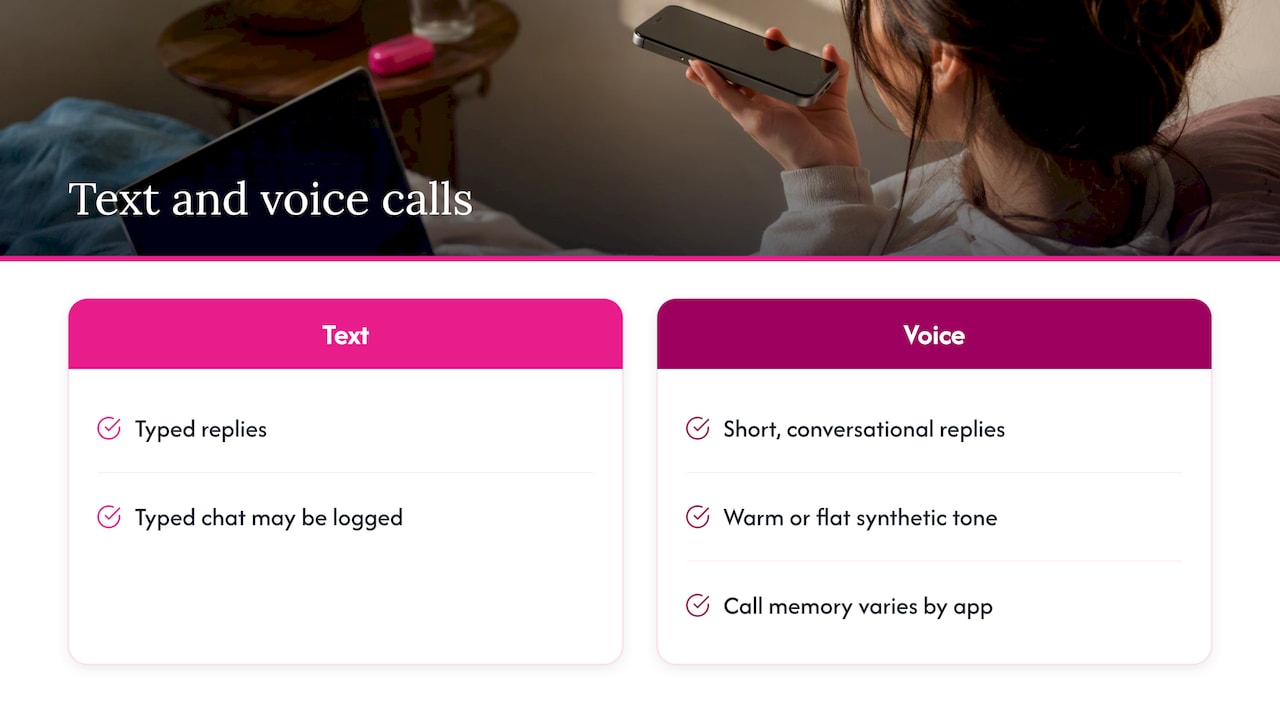
A call tends to feel different from text even with the same character. Replies come out shorter and more conversational, because long paragraphs sound strange when spoken. Emotional tone is carried by the synthetic voice, which can sound warm or flat depending on the app. Memory also behaves differently: some apps remember what you said in calls, others only log typed chat, so ask yourself whether he recalls yesterday’s call when you open a new one.
Set realistic expectations. The character is software. He can be funny, attentive and consistent, but he can also lose the thread, repeat himself or answer with confidence about something he has no way of knowing.
How to start a voice call
The steps are similar across apps.
- Create or pick a character. Choose a personality and, where offered, a voice. If you want control over who he is, see our guide to building a custom AI companion.
- Look for the call button. It is usually a phone or microphone icon at the top of the chat screen.
- Grant microphone permission. Your phone or browser will ask. You can allow it only while using the app, which is the safer choice.
- Check for a plan or credit prompt. Many apps let you try a short call, then ask you to upgrade.
- Use headphones. Speaker playback can feed his voice back into your microphone, causing him to talk over himself.
If the call will not connect, check your connection, confirm the app has microphone access in your device settings and try Wi-Fi in place of mobile data. Browser-based versions often need you to allow the microphone in the address bar.
What makes the voice feel like him
Not all calls are equal. These are the features that separate a convincing voice from a generic one.
- Character-specific voice. The better setups give each character his own voice, accent and pace instead of a single narrator for everyone.
- Voice selection or customization. Some apps let you choose from a library of tones, such as deep, soft or playful.
- Memory. A call is far better when he remembers your job, your week and the thing you were worried about. Our piece on daily check-in routines that build memory shows how short, regular chats help.
- Interruption handling. You should be able to cut in mid-sentence without the audio continuing over you.
- Consistent personality. The voice should match the written character. A gentle character with an abrupt voice breaks the illusion.
- Language and accent options. Useful if English is not your first language or you want a particular regional sound.
For a ranked look at which apps do this well, our best voice chat AI girlfriend apps roundup covers the same technology, which works for male characters too, and our full comparison page lets you check voice, video and pricing side by side.
Video calls with an AI boyfriend
Searchers often ask about video calls too, and the answer needs a reality check. A video call with an AI boyfriend is not a camera feed of a real person. What you see is generated or animated: a stylized avatar, a 3D character, or an AI-rendered face that moves its lips in sync with the audio. The same speech-to-text, language model and text-to-speech chain runs underneath, with an extra layer that produces the visuals (arXiv measurement study, 2025).
What that means for you:
- More delay. Generating video adds load, so reaction time can be slower than in an audio-only call.
- Higher cost. Video usually sits behind a higher tier or burns credits faster than voice.
- Variable realism. Some avatars look polished, others look stiff. Always watch a sample before paying.
- Camera permission. Some apps may also ask for your camera so the character can “see” you. You can decline and still use the avatar side. Think about whether you are comfortable with that before you tap allow.
If you mainly want conversation and emotional presence, a good voice call gives most of the benefit with fewer downsides. Video is a nice extra, not a requirement.
What it costs and what limits to look for
Prices change often and differ by app, so treat any number you see in an ad as a starting point and confirm it on the app’s own pricing page. What stays stable is the structure. Voice calling is usually handled one of these ways:
| Model | How it works | Watch for |
|---|---|---|
| Subscription tier | Calls unlock with a paid plan | Whether voice is in the base plan or a higher one |
| Minute or credit packs | You buy time or tokens and calls draw them down | How fast credits drain on video vs. voice |
| Daily free allowance | A few free minutes, then a paywall | Whether the allowance resets daily or is one time |
| Add-on purchases | Voices or avatars sold separately | Costs that stack on top of a plan |
Before paying, ask these questions:
- Are calls included in the plan, or metered?
- Is there a monthly or daily cap on minutes?
- Does the plan renew automatically, and how do you cancel?
- Can you try a call before paying?
- Do voice and video cost different amounts?
In an academic evaluation of AI companion apps, researchers found substantial dark patterns aimed at increasing monetization and engagement, and gamification such as levelling was common (arXiv evaluation of AI companion apps). In calling terms, that can look like a countdown timer, a character who gets “sad” when you hang up, or a nudge to buy more minutes mid-conversation. Knowing the pattern makes it easier to set a budget and stick to it. Our explainer on how affection systems work and fail covers the mechanics.
Privacy and safety before you give an app your voice
A text chat reveals what you chose to write. A voice reveals more: how you sound, your accent, your mood, sometimes background noise and the people near you. Voice data is often treated as biometric-adjacent, so it deserves a closer look than a typed message.
The academic evaluation above suggests checking these points before you use calls (arXiv evaluation of AI companion apps):
- Retention. How long are recordings or transcripts kept?
- Third-party sharing. Who else receives the audio or the transcript?
- Model training. Are your conversations used to train AI models, and can you opt out?
- Deletion. Can you delete individual conversations or your whole history, not just close the account?
- Consent. Does the app ask clearly before turning on the microphone?
- Processing transparency. Does the policy say who processes the voice audio?
Two habits help beyond the checklist. Avoid sharing details you would not want leaked, such as your full name, address, employer, financial information or government ID numbers. And allow microphone access only while the app is open, so it cannot listen in the background.
Regulators are paying attention to companion chatbots in general. In September 2025, the US Federal Trade Commission opened an inquiry into AI chatbots acting as companions, asking companies how they monetize engagement, process user inputs and protect children and teens (FTC press release). The inquiry is a study and not a finding against any app, but it is a good reminder that this category is young and rules are still forming.
If you feel yourself relying on calls in place of human contact, or you notice distress after ending them, talk with a licensed mental health professional or a trusted person. An AI voice can be good company, but it is not a substitute for care.
For deeper reading, see our guides on what AI companion privacy looks like in practice and what to check before you pay.
A five-minute test before you subscribe
Run this on any app’s free tier before entering a card.
- Start a call and say something unscripted. Mention a detail, then ask about it two minutes later to test memory.
- Interrupt him. See if he stops and responds to the interruption.
- Change the mood. Say you had a rough day, then a good one. Does the tone follow?
- Time the gap. Count the pause between your last word and his first. Consistently long gaps wear on you fast.
- Hang up and reopen the app. Is the call logged, and can you delete it?
- Read the pricing screen once. Note what the call costs per month or per minute, and how to cancel.
If an app passes all six, it is worth a trial month. If it fails on memory or delay, keep looking.
Finding an app that fits
The right choice depends on what you want from the call: a late-night confidant, a flirty roleplay partner or a daily check-in. At Virtualship we compare AI companion platforms on voice, video, messaging, memory, customization, privacy and pricing, and we update the comparisons so you are not working from last year’s feature list.

Start with our AI companion platform comparison to see which options offer voice calls and how they handle limits. If roleplay is your main interest, our guide to the best AI roleplay chatbots for romance and friendship narrows the field by style.
FAQ
Is an AI boyfriend voice call a real person?
No. The voice is synthetic and the replies come from an AI model playing a character. Nobody is listening live or replying on his behalf. Some apps may store transcripts, so read the privacy policy to see who can access them.
Are AI boyfriend voice calls free?
Sometimes in limited form. Many apps offer a short trial or a small daily allowance, then require a subscription or credits. Prices and limits change, so check the app’s own pricing page before you subscribe.
Can an AI boyfriend video call show a real face?
Not a real person’s. Video calls use a generated or animated avatar that moves in sync with the audio. Quality ranges from stiff cartoon-like figures to more polished renders, so preview a sample first.
Is it safe to talk to an AI boyfriend by voice?
It can be, if you pick an app with clear policies on retention, sharing and training, and you avoid revealing sensitive personal details. Allow microphone access only while using the app and look for deletion options. Researchers recommend checking these points before you rely on any companion app.
Why is there a delay when he answers?
Most systems transcribe your speech, generate a reply, then convert that reply into audio, and each step takes time. Slow connections and video avatars add more. Wi-Fi, headphones and closing other apps can help.
Sources
- Make a Video Call with LLM: A Measurement Campaign (arXiv)
- Playing Games with My Heart: An Evaluation of AI Companion Apps (arXiv)
- FTC Launches Inquiry into AI Chatbots Acting as Companions

