

Yes, voice cloning for AI companions is real, works well enough to feel personal, and most platforms now offer some version of it. Before you upload a single sample, though, check the exact thing that decides whether this is a good idea for you: the platform’s terms of service around deletion and consent. If a platform won’t tell you plainly how to delete your voice data, that’s your answer.
TL;DR:
- Ensure the platform clearly states how to delete your voice data and verify if it requires rights confirmation before uploading samples.
- Test the clone’s fidelity with varied emotional phrases during a free trial and check for voice drift or quality decline over time.
- Confirm the platform’s policies on voice persistence, multilingual consistency, and whether cloning someone else’s voice is verified or allowed.
- Be cautious of platforms that do not offer transparent deletion timelines, do not embed provenance metadata, or lock your voice within non-exportable accounts.
- Prefer platforms with professional-grade cloning that requires longer training samples, and test their real-time response latency and customization options.
Table of Contents
- What Is a Voice Cloning AI Companion, and How Does the Tech Work?
- Does a Cloned Voice Actually Change How You Bond With an AI?
- How Do You Compare Voice-Enabled Companion Platforms?
- How Do You Record the Best Sample for a Natural-Sounding Clone?
- What Should You Check Before Trusting a Platform With Your Voice?
- What’s New in Voice Cloning Technology for Companions?
- Which AI Companion Platforms Actually Do Voice Cloning Well?
- Where Virtualship.ai Fits Into Your Search
- Sources
What Is a Voice Cloning AI Companion, and How Does the Tech Work?
A voice cloning AI companion is a chatbot or virtual partner app that generates speech in a custom voice, either one you recorded yourself or one designed to sound like a specific person, instead of a generic text-to-speech voice. This is the core of “personalized voice AI” in the companion space: the same personality, but a voice that feels like yours or one you chose.
There are two flavors, and the difference matters when you’re comparing platforms. Zero-shot cloning builds a voice from a short reference clip, sometimes just 5 to 15 seconds, and can produce a usable voice identity almost instantly, according to Inworld’s documentation on voice AI for companions. Professional or fine-tuned cloning trains on a much larger dataset, and ElevenLabs’ voice cloning documentation puts that range at 30 to 180 minutes of audio for its Professional tier, versus roughly 1 to 2 minutes for Instant Voice Cloning. More training data generally means better fidelity, especially on accents or speech patterns that a short sample can’t fully capture.
Behind the scenes, a realtime companion pipeline strings together several components:
- Speech-to-text (STT) converts your spoken input into text the AI can process.
- A language model generates the response content and personality.
- Text-to-speech (TTS) renders that response back into the cloned voice.
- Voice identity persistence keeps the same voice consistent across sessions, not just within one chat.
That persistence piece is the one people underestimate. A companion that sounds different every time you open the app breaks the illusion fast. Production-grade stacks now handle this through realtime APIs with built-in voice activity detection and turn-taking, the same architecture Inworld describes for keeping conversation flow natural and low-latency, which is the difference between a companion that feels present and one that feels like a phone tree.
Does a Cloned Voice Actually Change How You Bond With an AI?
It does, and the effect is measurable, not just anecdotal. Research on AI voice interaction found that when a cloned voice resembles the user’s own voice or a familiar one, people report higher self-disclosure and stronger perceived closeness, according to an AMCIS 2025 study on transference in human-AI voice interactions. That’s a real psychological hook: hearing something familiar lowers your guard, and companion apps that lean into voice cloning are, whether they say so or not, using that mechanism deliberately.
But the same research notes reactions vary a lot from person to person, and can shift the longer you use the app. Some people find an own-voice clone comforting for a week and unsettling by week three. That’s worth sitting with before you commit to a subscription built around one specific voice.
The failure modes are just as important as the upside:
- Style mismatch. A voice can be acoustically close but wrong in cadence or emotional tone, and that mismatch tends to bother users more than a slightly “off” timbre does.
- Voice drift. Some clones degrade or shift subtly over weeks of use, especially with lower-tier zero-shot models.
- Emotional dependence. A companion that talks like someone specific to you can deepen attachment faster than a text-only chatbot, which cuts both ways.
- Non-consensual cloning. Anyone can attempt to clone a voice they don’t have rights to, and current models don’t reliably block this on their own.
Ethical guidance for this technology is still catching up to what it can already do, and UCL researchers studying voice cloning ethics specifically call out designing a voice for a digital partner as a use case where consent verification and transparency haven’t kept pace.
Pro Tip: Give any new cloned voice a 48-hour trial before upgrading to a paid tier. Emotional reactions to a voice often shift once the novelty wears off, and you want to know that before you’re locked into a year of billing.
How Do You Compare Voice-Enabled Companion Platforms?
Run through this in order. Skipping the policy checks to get to the fun feature checks is how people end up regretting a purchase.
- Read the consent clause first. Does the platform require you to confirm you have rights to any voice you upload, and does it verify that in any way beyond a checkbox?
- Find the deletion and export policy. Ask specifically: can you delete your voice sample and any trained model derived from it, and how long does that take to actually process?
- Test the demo before paying. A five-minute free trial reveals more about voice fidelity than any marketing page.
- Check multilingual behavior if it matters to you. Some systems preserve a cloned identity across languages; many do not, and switching languages can expose a clone’s weaknesses fast.
- Confirm the pricing structure for cloning specifically. It’s separate from the base subscription on plenty of platforms.
On that last point, don’t assume voice cloning is included just because you’re paying for the app. Inworld offers free zero-shot cloning as part of its infrastructure, while ElevenLabs gates its Professional cloning tier with different export and ownership terms depending on the plan. Companion apps built on top of these systems inherit that same split, so the same feature can be free on one platform and a $15-a-month add-on on another.
Beyond policy, weigh these technical criteria side by side:
- Voice persistence across sessions, not just within a single chat window.
- Latency, meaning how long you wait between speaking and hearing a response.
- Customization depth, like pitch, pacing, and emotional tone controls.
- Export and ownership rights, in case you ever want to leave the platform.
How Do You Record the Best Sample for a Natural-Sounding Clone?
Good input produces a good clone, and that’s not a throwaway line. It’s the actual guidance from ElevenLabs’ own documentation, which stresses clean, consistent, single-speaker audio as the biggest lever you control.
Before you record anything:
- Use a quiet, non-echoey room. A closet full of clothes works better than an empty living room.
- Use a decent external mic if you have one. A phone mic in a quiet room still beats a laptop mic in a noisy one.
- Speak in your natural register. Don’t perform a voice; read like you’re talking to a friend.
- Record several short takes with the same energy level. Consistency across clips matters more than any single perfect take.
For sample length, match it to your goal. A zero-shot clone can work from as little as 5 to 15 seconds of clean audio, per Inworld’s specs, which is fine for a quick test. If you want a professional-grade clone with real fidelity, budget closer to the 30-to-180-minute range ElevenLabs recommends for its top tier.
Pro Tip: Test drift by walking away and coming back 24 to 72 hours later with the same prompt. If the voice sounds noticeably different on return, that’s a persistence problem worth flagging before you pay for anything long-term.
Use short, emotionally varied test phrases, neutral, affectionate, and playful, rather than one flat sentence. Prosody, not just timbre, is what your ear actually notices.
What Should You Check Before Trusting a Platform With Your Voice?
Start with the terms of service, and actually read the section on data retention, not just the marketing summary above it. Look for a specific deletion timeline (30 days is common; “upon request, processed promptly” is a red flag with no teeth) and whether deleting your account also deletes the trained voice model, not just your chat history.
Then run a real test:
- Request your data. A platform with a working export or deletion flow will confirm the request and give you a timeframe.
- Ask about watermarking or provenance metadata. This is a technical marker embedded in generated audio that helps trace where a clip came from, and UCL’s research on voice cloning ethics specifically recommends it as a practical defense against misuse.
- Check whether the platform lets you clone someone else’s voice without verification. If it does, that’s a serious trust gap, not a feature.
For a hands-on walkthrough of consent workflows built for exactly this kind of scenario, this five-step consent production guide is a useful reference even outside its original context, since the verification logic transfers directly to companion voice uploads.
Avoid any platform that locks your cloned voice inside a non-exportable account, since that’s a sign your data has more value to them locked in than it does to you as a feature. Prefer platforms that talk openly about third-party audits or publish a clear, specific consent flow instead of a vague privacy paragraph buried in a 40-page terms document. If privacy is a bigger concern than convenience for you, look into offline or local-inference options, which keep voice processing off external servers entirely.
What’s New in Voice Cloning Technology for Companions?
The biggest shift over the past year has been speed. Zero-shot cloning from a handful of seconds of audio used to sound noticeably synthetic; now it’s close enough that most users can’t tell the difference in casual conversation, particularly on emotionally neutral phrases. The gap that remains is on rare accents and unusual speech patterns, where short-sample cloning still tends to smooth things out in ways that lose personality.
Realtime infrastructure has caught up too. Companion platforms now commonly run on architecture that combines a realtime API, a dedicated low-latency TTS layer, and a routing system that picks the right model for the moment, the kind of stack Inworld describes for production use. That routing matters because a single model rarely handles both fast casual replies and longer emotional exchanges equally well.
Multilingual cloning is the other area worth watching. Voice identity used to break down almost completely when a companion switched languages mid-conversation. Newer systems are getting better at preserving the same vocal identity across languages, which matters if you’re bilingual and want your companion to sound like the same “person” whether you’re speaking English or Spanish to it.
None of this means the technology is finished. Voice drift over long usage periods, emotional tone under stress or excitement, and consistent handling of interruptions are still rough edges across most platforms. Anyone shopping right now should test these specific weak points rather than trusting a polished demo clip, since demos are, by definition, recorded under ideal conditions.

Which AI Companion Platforms Actually Do Voice Cloning Well?
Platforms in this space split roughly into three tiers, and knowing which tier you’re looking at saves a lot of wasted trial signups.
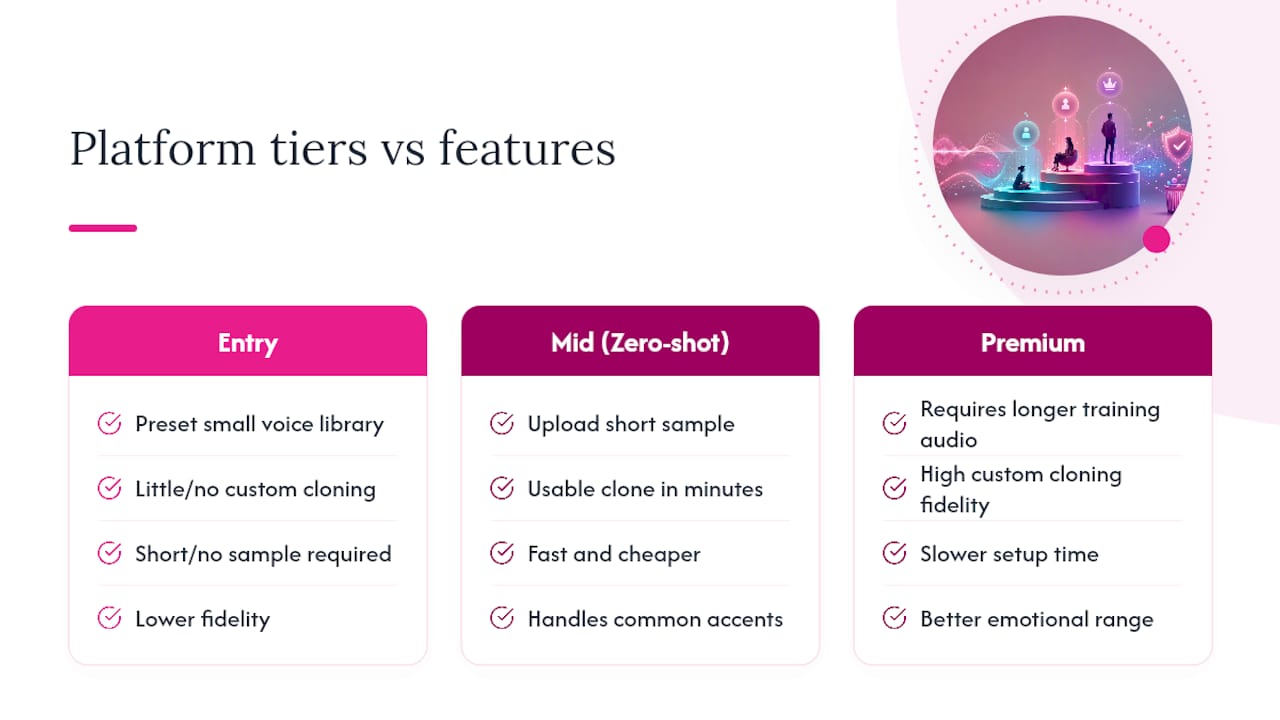
Entry-level companion apps typically offer a small library of preset voices with limited or no custom cloning. These are fine if you just want a pleasant voice and don’t care about personalization, but they won’t get you the “sounds like someone specific” experience that most people searching for voice cloning actually want.
Mid-tier platforms with zero-shot cloning let you upload a short sample and get a usable clone within minutes. The upside is speed and usually a lower price point. The downside is fidelity: these clones handle common accents and calm speech well, but can stumble on distinctive speech patterns or strong emotional delivery, consistent with the accent limitations ElevenLabs documents for instant cloning.
Premium or professional-tier platforms ask for longer training audio and deliver noticeably higher fidelity, including better handling of emotional range and accent nuance. The trade-off is cost and setup time. You’re also more likely to encounter export restrictions here, so check ownership terms before committing.
Rather than picking blind, run the checklist from this guide against each platform’s free trial before paying for anything. The differences between tiers show up fast once you actually test a demo with varied emotional phrasing instead of reading one flat sentence.
Where Virtualship.ai Fits Into Your Search
Testing every companion platform’s voice cloning claims yourself takes hours you probably don’t have, especially when half the marketing pages don’t mention pricing gates or export restrictions until you’re already signed up. Virtualship.ai runs that legwork for you, with hands-on notes on voice quality, persistence, and consent policies across the platforms that actually offer this feature.

The voice chat AI girlfriend app roundup filters specifically for platforms with real voice customization, not just a preset library dressed up as personalization, and flags which ones handle session-to-session persistence well. If privacy is your bigger concern, the AI companion safety checklist walks through exactly what to look for in a terms-of-service page before you upload anything.
Run your own checklist from this guide against the full platform comparison and see which options actually clear the consent, persistence, and pricing bars you now know to check.
Sources
- Voice AI for AI Companions | Inworld AI
- Voice Cloning | ElevenLabs documentation
- UCL research on voice cloning ethics and policy

