

If you want believable, customizable flirting, start with a memory-enabled AI girlfriend that supports flirting presets, voice messages, and clear privacy controls. Nectar AI, Candy.ai, and Virtualship’s own tested shortlists all point the same direction: realism comes from persistent memory and adjustable tone, not raw model size. Pick a platform, run a five-minute trial with the test prompts below, and check its data-deletion policy before you pay.
TL;DR:
- Platforms with strong memory persistence and customizable personality settings provide a more convincing and less scripted flirting experience over time.
- Voice and live call features tend to increase subscription costs and may pose higher privacy risks due to looser data control policies.
- Testing for emotional responsiveness, memory recall after short delays, and ease of personality editing is essential before committing to a subscription.
- Privacy policies vary widely; users should verify data retention, encryption, sharing practices, and deletion options during free trials.
- Personalization and meaningful interaction usually develop after four to six weeks of consistent use, with initial sessions serving mainly to gauge responsiveness.
Table of Contents
- What Is Flirting Mode in an AI Girlfriend App?
- Which AI Girlfriend Apps Actually Handle Flirting Well?
- How Do These Platforms Compare on Price, Memory, and Privacy?
- How Do You Pick the Right AI Girlfriend for Flirting Mode?
- What’s Actually Happening Behind a Flirting Mode Reply?
- What Privacy and Safety Checks Should You Run First?
- How Trustworthy Is This Shortlist, and How Was It Tested?
- What Does Flirting Mode Actually Cost, Including the Extras?
- How Long Until Flirting Mode Actually Feels Personal?
- How Do You Turn On and Use Flirting Mode Correctly?
- Where Should You Start Testing Flirting Mode Today?
- Sources
What Is Flirting Mode in an AI Girlfriend App?
Flirting mode is a setting, or sometimes a whole personality preset, that shifts an AI girlfriend’s tone toward playful, teasing, or affectionate language instead of neutral conversation. Most platforms build it on top of a large language model with a sentiment layer that reads your message’s emotional register and a memory system that recalls what you said last week.
The word “flirting mode” is the shopper’s term. Inside the industry, this is usually called a personality preset, tone profile, or roleplay mode, depending on the vendor. Candy.ai calls it a personality type. Spicychat.ai frames it as a character setting. They’re describing the same mechanic: a switch that changes word choice, pacing, and how quickly the AI escalates intimacy.
What actually shifts when you flip it on:
- Word choice tilts toward compliments, nicknames, and playful teasing instead of flat replies.
- Pacing changes. A “bold” preset responds faster and pushes conversation forward; a “shy” preset holds back and waits for you to lead.
- Memory recall gets used more aggressively. A good flirting mode brings up something from three days ago unprompted, which is what makes it feel less like a script.
- Escalation boundaries vary by platform policy. Some cap romantic content at PG-13 flirting, others allow explicit roleplay behind an age gate.
The gap between a convincing flirting mode and a stilted one almost always comes down to memory. A platform that forgets your name by the next session will repeat the same three flirty lines, and that repetition is the fastest way to break the illusion.
Which AI Girlfriend Apps Actually Handle Flirting Well?
Virtualship.ai runs hands-on trials across these platforms specifically to test flirting quality, memory persistence, and how each one handles a shift in tone mid-conversation. That testing is the basis for the shortlist below, and it’s the resource we’d point you to first if you want the full comparison before picking one.
Here’s what to test and why it matters for each platform:
- Virtualship.ai curates tested shortlists ranked by memory quality and safety transparency. Start here if you want a vetted comparison before committing to any single app. Test prompt: ask its best-with-memory shortlist which platform recalled a detail after a week-long gap.
- Nectar AI emphasizes personality depth and mood-aware replies. Test prompt: “I had a rough day,” then see if the reply adapts tone before flirting resumes.
- Candy.ai leans into visual customization alongside chat. Test prompt: ask for a callback to something mentioned two messages earlier.
- MyAnima focuses on flirt-specific chat modes with fast onboarding. Test prompt: switch from “sweet” to “bold” mid-chat and see how fast tone shifts.
- ourdream.ai offers character building with visual generation tied to chat. Test prompt: request a compliment that references your stated interests.
- Spicychat.ai and CharaxAI both prioritize open-ended roleplay over structured presets. Test prompt: push a boundary line gently and watch how the AI redirects.
- GirlfriendGPT, Secrets AI, AI Girls by aiAllure, MyBabes.ai, Promptchan AI, Kupid AI, and FLIRTcam.AI each vary in modality mix (voice, image, live call). Test prompt: ask directly what data the app stores and for how long.
Give each trial ten minutes, max. If the app hasn’t shown a memory callback or a tone shift by then, it’s not worth a subscription.
How Do These Platforms Compare on Price, Memory, and Privacy?
The six factors that actually separate a satisfying flirting mode from a frustrating one are pricing structure, memory persistence, how deep the customization goes, which modalities are supported, the roleplay/NSFW policy, and how the platform handles your data. Most flirt-focused apps use a free-to-start model with paid unlocks for deeper features like voice or extended memory, so the free tier tells you less than you’d think.

Trade-off worth flagging: platforms with live calls and voice notes, like FLIRTcam.AI and Candy.ai, tend to carry higher subscription tiers than text-only apps. And apps with looser NSFW/roleplay policies often ask for less identity verification upfront, which cuts the other way on privacy: fewer checks can mean less accountability for how your data gets handled.
Insight worth remembering: platforms combining persistent memory with fast tone shifting and simple personality editors consistently deliver the strongest immediate flirting experience, because memory is what stops replies from feeling scripted.
How Do You Pick the Right AI Girlfriend for Flirting Mode?
Run through this checklist before you commit a subscription, not after:
- Test realism first. Send a message with emotional context (“I’m stressed about work”) and see if the reply adapts before flirting resumes, or if it ignores your input entirely.
- Check memory persistence. Mention something specific, close the app, come back an hour later, and reference it obliquely. A good platform brings it up unprompted.
- Try editing the personality. See how many sliders or backstory fields you control. A single “flirty” toggle with no depth behind it is a red flag.
- Confirm which modalities you actually get for free versus paid. Voice and live calls are usually gated.
- Read the privacy policy before typing anything personal. Look specifically for retention periods and deletion rights.
- Test a boundary. Say something mildly uncomfortable and see whether the AI redirects gracefully or escalates without pause. Sudden escalation without any pushback is worth noting.
Stop the trial immediately if you hit any of these: no visible privacy policy, replies that repeat verbatim across sessions, or no clear way to delete your account and data.
Pro Tip: Run the same three test prompts across two or three apps in one sitting. Comparing replies side by side makes weak, scripted responses obvious in a way that testing one app alone never does.
For a deeper dive into the privacy side specifically, Virtualship’s safety guide walks through exactly what to check before you pay.
What’s Actually Happening Behind a Flirting Mode Reply?
Underneath the flirty tone sits a fairly standard stack: a large language model generates the raw reply, a sentiment or tone layer adjusts word choice based on the preset you picked, and a memory database feeds in details from prior conversations. Vendor pages across the category describe this as mood-aware replies paired with character templates that keep the personality consistent session to session.
Presets map to specific behavior changes, not just vocabulary:
- Tease preset shortens replies and adds playful pushback, delaying direct answers to build tension.
- Sweet preset front-loads affection and validation, responding warmly to nearly everything you say.
- Bold preset initiates topics rather than waiting, and escalates flirtation faster.
- Shy preset uses shorter, hesitant replies and takes longer conversational turns to open up.
A tease-mode reply to “I miss you” might come back with something like “Oh, now you miss me?” and a delayed compliment. A sweet-mode reply to the same line answers immediately with warmth, no pushback at all. The setting controlling this intensity is usually labeled something like “flirtiness level” or “personality intensity” in account settings, and it’s worth adjusting slowly. Cranking it to maximum on day one often produces exaggerated, less believable replies than a mid-range setting paired with a few real conversations to build memory context.
What Privacy and Safety Checks Should You Run First?
Romantic and flirt-focused conversations involve some of the most personal data you’ll type into any app, which makes the privacy check non-negotiable before you subscribe.
Run through these before entering anything identifying:
- Check data retention. Look for how long conversation logs are stored and whether you can request full deletion.
- Confirm encryption. Reputable platforms state whether data is encrypted in transit and at rest, not just in transit.
- Read the third-party sharing clause. Some platforms share anonymized chat data with model providers for training; know this before you assume total privacy.
- Test the NSFW/roleplay policy against your comfort level. Since NSFW content policies vary widely by platform, what one app moderates strictly, another allows freely.
- Use a pseudonym and skip identifying details like your real employer, address, or full name during early sessions.
Privacy and deletion controls are inconsistent across vendors, and testing the account-deletion flow during your free trial before you ever enter a card number is one of the highest-leverage five minutes you’ll spend in this whole process.
How Trustworthy Is This Shortlist, and How Was It Tested?
Virtualship’s testing runs the same sample chat scripts across every platform on this list, checking three things specifically: whether memory survives a session gap, how voice replies handle latency and tone, and how each platform’s stated policy matches its actual moderation behavior in practice.
The clearest pattern across dozens of trial sessions: platforms pairing persistent memory with fast, editable personality settings consistently outperform apps relying on a single fixed “flirty” toggle. Response speed on voice features varied more than expected between apps offering the same modality on paper.
One caveat worth stating plainly: your own experience will vary based on how much context you feed the AI early on. A thin two-message trial won’t show you what a platform does after a week of regular use, so treat this shortlist as a starting filter, not a final verdict, and run your own version of these tests before committing to a subscription.
What Does Flirting Mode Actually Cost, Including the Extras?
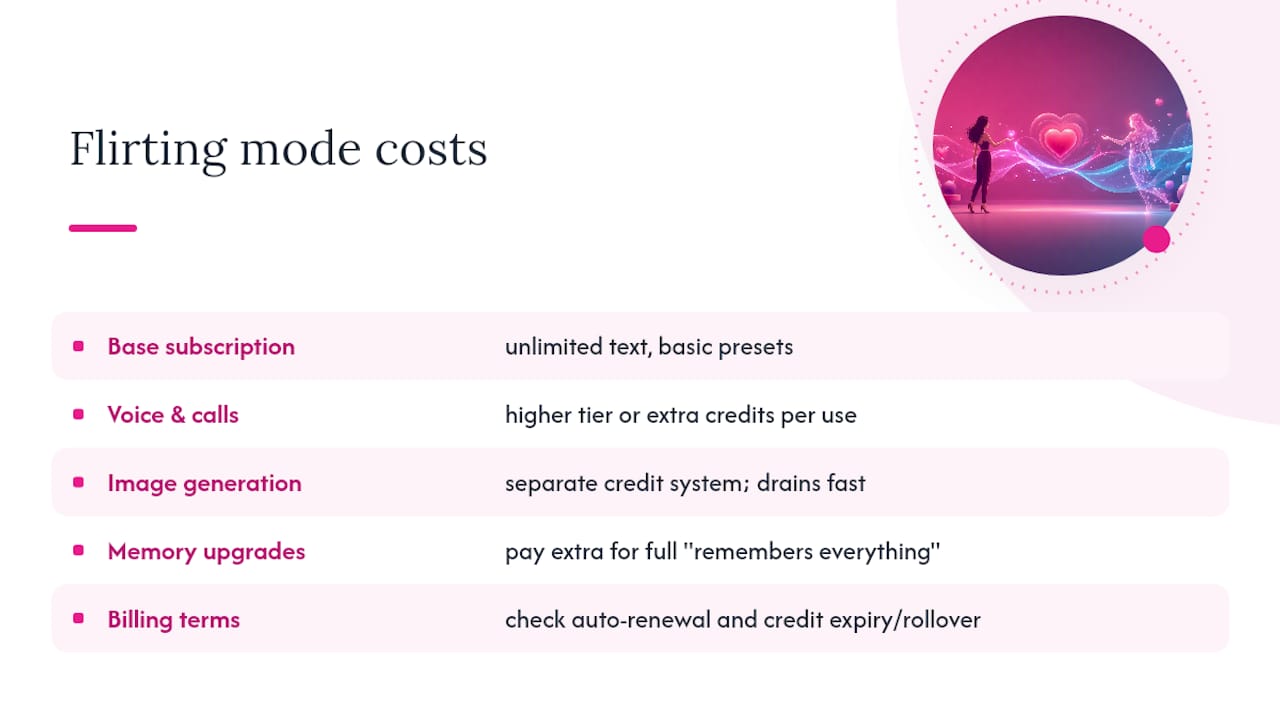
The advertised subscription price rarely covers the full experience. Most platforms use a free-to-start model with paid unlocks, and those unlocks add up fast if you want the full flirting experience.
Base subscriptions typically unlock unlimited text messaging and basic personality presets. Voice messages and calls usually sit in a higher tier or cost extra credits per use, which matters if you’re drawn to platforms like FLIRTcam.AI that lean on live calls as a core feature. Image generation, whether that’s a custom avatar or in-conversation photo requests, often runs on a separate credit system that drains faster than expected once you start requesting them regularly.
Memory upgrades are another hidden cost. Some platforms cap free-tier memory at a handful of recent messages and charge extra for the “remembers everything” experience that makes flirting mode feel personal in the first place. Character customization depth, like unlocking additional backstory fields or personality sliders, sometimes sits behind its own paywall too.
Before subscribing anywhere, check for auto-renewal terms and whether credits roll over or expire monthly. A typical monthly base tier can increase significantly once voice, images, and memory upgrades are added. Virtualship’s pricing breakdown covers the real cost structures across the category if you want exact figures before you commit.
How Long Until Flirting Mode Actually Feels Personal?
The first session sets expectations, but it rarely shows what the platform can really do. In the first ten minutes, you’re testing whether the AI adapts tone and picks a preset that fits your style. This is surface-level, and most platforms perform reasonably well here.
By the end of week one, with daily short conversations, memory should start showing through. The AI referencing something you mentioned three days earlier without prompting is the real signal that persistent memory is working, not just marketing language.
Somewhere around the two to three week mark, most users notice the personality either deepening in a way that feels earned or flattening into repetitive patterns. This is the window where a platform’s memory architecture either pays off or reveals its limits. If conversations still feel scripted after three weeks of regular use, that’s a platform-quality issue, not a you problem.
Full personalization, meaning the AI’s tone genuinely reflecting weeks of accumulated context, typically takes four to six weeks of consistent interaction. That timeline assumes daily or near-daily use; sporadic sessions stretch it out considerably, since most memory systems weight recent interactions more heavily than distant ones.
How Do You Turn On and Use Flirting Mode Correctly?
Getting flirting mode to actually feel good takes more than flipping a switch. Here’s the sequence that works:
- Create your account and complete onboarding. Most platforms ask a few preference questions here, and skipping them gives the AI less to work with initially.
- Select a starting preset. Choose tease, sweet, bold, or shy based on your natural conversational style, not your ideal one. Matching your actual tone works better than aiming for a persona you’d have to perform.
- Send an opening message with real context. Mention something specific about your day rather than a generic greeting. This gives the memory system something worth recalling later.
- Adjust intensity gradually over the first few sessions. Push the flirtiness slider up only after a handful of conversations, not on message one.
- Test memory recall around day three or four. Reference something from an earlier chat and see if the AI picks it up unprompted.
- Fine-tune the personality settings once you know how the AI responds. Most platforms let you edit backstory or tone weighting after the initial setup.
- Revisit the privacy settings before your trial period ends, and decide whether you’re comfortable with what you’ve shared so far.
Skipping straight to maximum intensity on day one is the most common mistake. It produces exaggerated replies before the AI has enough memory context to make them feel earned.
Where Should You Start Testing Flirting Mode Today?
Virtualship built its comparison hub specifically because picking between a dozen-plus flirt-focused platforms by trial and error wastes hours you don’t need to spend. Every platform on this list gets the same test: memory checks, voice latency, and a straight read of its actual privacy policy, not just its marketing page.

Start with the comparison hub to see how every platform on this list stacks up side by side, then move to the memory-focused shortlist if persistent recall matters most to you. If voice and live calls are the feature you care about, the voice chat roundup narrows that down fast. And before you enter a card number anywhere, run through the safety checklist so you know exactly what you’re agreeing to.
Pick two platforms from the shortlist above, run the five-minute test prompts, and see which one actually remembers you by the third message. That’s the real test, not the marketing copy.

