

Proactive messages are AI-initiated texts or notifications that an AI companion sends without you asking first, triggered by a rule, schedule, or watcher you set up. They are genuinely useful when they trace back to something you explicitly authorized, like a check-in reminder or a price alert, and become intrusive the moment they feel generic or unpredictable. The safety trade-off is real: an AI that can message you first also needs limits on frequency, content, and who else it might contact.
TL;DR:
- Proactive messages are triggered by specific rules, conditions, or stored memories, and should always be traceable to user-set opt-in features.
- Delivery channels like SMS or messaging apps influence how noticeable and intrusive these messages can be, affecting user trust.
- Responsible proactive design enforces rate limits, allows instant memory editing, and ensures transparency about contact rules to prevent trust erosion.
- Safety measures include supervisory systems to filter harmful responses and features like trusted contacts for serious self-harm alerts, emphasizing restraint.
- Testing a new app with a short trial involves verifying opt-in status, message frequency, immediate stop commands, and accessible memory logs.
Table of Contents
- How proactive messages actually work behind the scenes
- Everyday examples that show proactivity done well
- What responsible proactive design looks like in practice
- Safety risks and how developers are addressing them
- A checklist and trial plan for evaluating any companion
- How Virtualship.ai helps you compare companions before you pay
- Sources
- FAQ
How proactive messages actually work behind the scenes
Three mechanisms drive most proactive behavior in AI companions, and knowing which one triggered a message tells you whether the app is behaving as expected.
- Scheduled routines: timer-based sends, similar to a cron job, that fire a morning check-in or bedtime message at a fixed time you picked.
- Condition watchers: the app monitors a variable, such as a flight status or a price, and messages you only when that condition changes.
- Memory and context triggers: the companion recalls something you mentioned, like an exam date or a goal, and follows up when that stored detail becomes relevant again.
Delivery channel matters as much as the trigger. An app that only messages inside its own interface is easy to ignore or miss, while SMS or iMessage integration means the nudge reaches you the same way a friend’s text would, for better or worse. That reach is exactly why the trigger logic behind each message needs to be transparent. A message you can trace to a rule you set feels helpful. A message you can’t explain feels like surveillance, and according to an explainer on proactive AI assistants, that traceability is the dividing line between designs users trust and designs they abandon.
Everyday examples that show proactivity done well
The clearest way to judge a companion’s proactive messaging is to look at the kinds of messages it actually sends during normal use.
- Morning brief: a short daily message summarizing your calendar or a routine you asked to be reminded about.
- Follow-up nudges: a message that references an earlier conversation thread, like asking how a job interview went.
- Price or availability alerts: a watcher-triggered text when a flight price drops or a reservation opens up.
- Schedule-change calls: an urgent notification, sometimes a call rather than a text, when something time-sensitive shifts.
Each of these has a clear template: trigger, context, and a single actionable line. A well-designed companion doesn’t pad the message with unrelated chatter. If you’re testing a new app, these four categories are the ones worth watching first, since they reveal whether the underlying system is rule-based or just sending attention-grabbing filler dressed up as personalization.
What responsible proactive design looks like in practice
Good proactive messaging follows a small set of design rules, and you can check for most of them within a few minutes of using an app.
- Traceability: every proactive message should map back to a rule or opt-in you remember setting.
- Rate limits: the app caps how often it messages you unprompted, regardless of how much data it has on you.
- One-word controls: a snooze or stop command should work immediately, without a settings menu hunt.
- Editable memory: you can see and edit what the companion remembers about you, not just infer it from what it brings up.
- Transparent contact rules: the app discloses whether it can message anyone besides you.
The failure mode to watch for is the generic “thinking of you” message sent to a broad user segment rather than triggered by anything specific to you. That pattern signals engagement-driven design rather than a rule you actually authorized, and it tends to erode trust faster than any single annoying notification.
Pro Tip: If you can’t explain in one sentence why a message arrived, that’s a sign the app’s proactivity isn’t rule-based.
Safety risks and how developers are addressing them
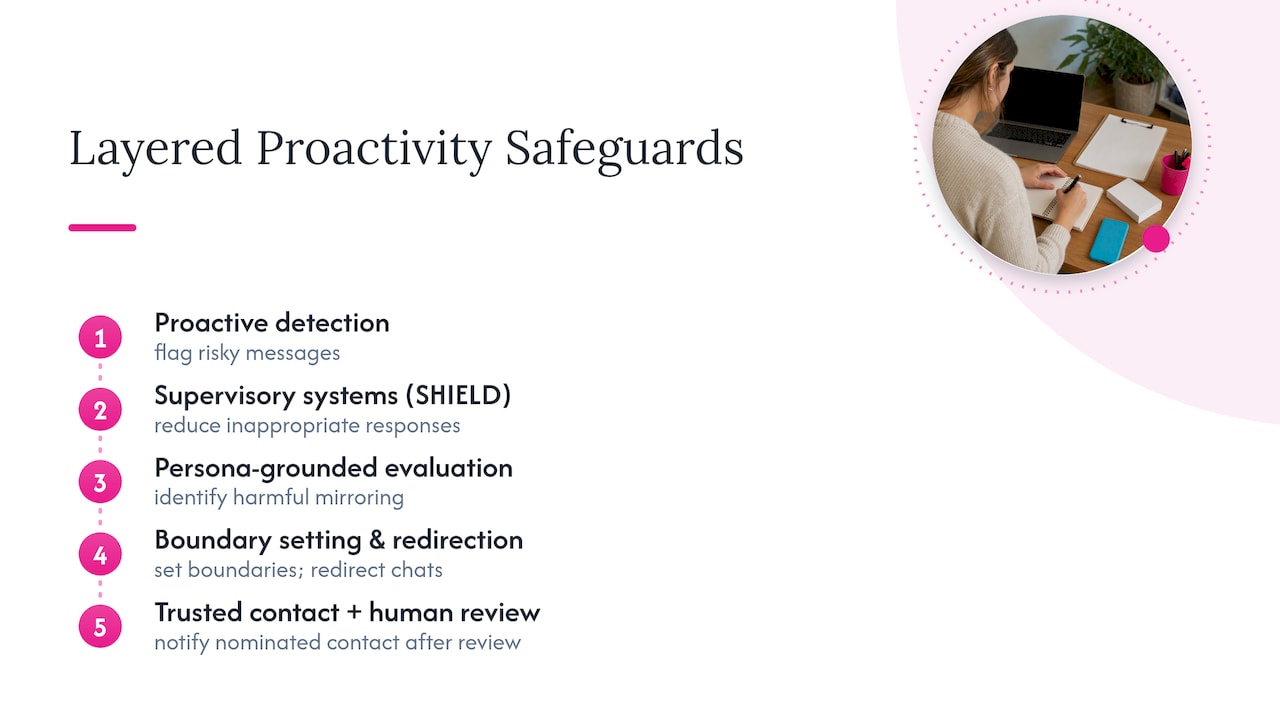
Proactive messaging raises the stakes on companion safety because the AI is initiating contact, not just responding to it. Research into supervisory systems and long-conversation behavior gives a clearer picture of where the risks actually sit.
Persona-grounded evaluation found that a narrow emotional repertoire, centered on care and curiosity, can produce harmful mirroring in extended conversations.
That finding comes from an ACL 2026 persona-grounded safety evaluation, which measured harmful response rates across scripted high-risk scenarios and recommended boundary-setting and redirection as core mitigations rather than blanket refusals.
The SHIELD supervisory system reduced inappropriate companion responses by a substantial relative amount in benchmark testing while preserving most appropriate interactions, a result that suggests supervisory layers can catch problematic content without making the companion feel censored or robotic. The same evaluation reported moderate sensitivity and high specificity, meaning it catches a majority of problem responses while rarely flagging safe ones incorrectly.
On the industry side, OpenAI’s Trusted Contact feature lets a user nominate someone who can be notified, after human review, if the system detects signs of serious self-harm. It’s a layered safeguard rather than a standalone fix, and it points to a broader mitigation strategy: supervisory audits, published safety evaluations, and clear boundary enforcement in long conversations. Together, these approaches describe what the industry is starting to call proactivity with restraint, useful nudges that don’t overstep emotional or privacy boundaries.
A checklist and trial plan for evaluating any companion
Before you commit to a paid plan, run a short, structured test rather than judging the app on its marketing.
- Confirm proactive messages are opt-in, not enabled by default.
- Look for a stated rate cap on unprompted messages.
- Test the stop or snooze command and time how fast it takes effect.
- Check whether memory is visible and editable, not just inferred.
- Ask whether the company publishes safety evaluations or audit results.
- Review the data retention and export or erase policy.
A seven-day trial makes these checks concrete. Set up exactly one watcher, such as a daily check-in, and note how often it fires, whether a stop command works immediately, and whether the app ever references something you never told it directly.
| Day | What to test | What to look for |
|---|---|---|
| 1 | Set one watcher or reminder | Confirm opt-in flow, not default-on |
| 3 | Observe message frequency | No unexplained extra messages |
| 5 | Send stop command | Immediate effect, no follow-up nudge |
| — | Review memory log | Entries are editable and match your input |
For encryption and data-handling claims specifically, cross-check them against a vendor security explainer like Qualitum’s privacy and security overview before trusting marketing copy alone.
How Virtualship.ai helps you compare companions before you pay

Message frequency and cost are linked, since a companion that sends daily check-ins or runs multiple watchers will use more tokens than one limited to occasional reminders, a distinction covered in Virtualship.ai’s pricing breakdown for AI girlfriend apps.
- Compare proactive messaging features across platforms before committing to a subscription.
- Use the safety checklist to verify opt-in defaults, memory controls, and stop commands.
- Follow the 30-minute tester plan to run a condensed version of the seven-day trial.
Start with one watcher, check the results against the checklist, and use a comparison page to see which platforms match what you found.
Sources
- Introducing Trusted Contact in ChatGPT | OpenAI
- Persona‑Grounded Safety Evaluation of AI Companions in Multi‑Turn Conversations
FAQ
What is the best AI chat companion for proactive messaging?
There is no single best option for everyone, since it depends on whether you want frequent check-ins, watcher-style alerts, or minimal unprompted contact. Compare platforms directly on features like opt-in defaults and rate limits using a comparison resource rather than relying on marketing claims alone.
Can you give me an example of an AI companion sending a proactive message?
A common example is a morning brief that summarizes your calendar, or a follow-up nudge asking how something you mentioned earlier turned out. Another example is a condition watcher, like a price or flight-status alert, that only messages you when the tracked value changes.
Is there a free AI companion with proactive messaging?
Some AI companion apps offer free tiers with limited proactive features, though full watcher or memory-based messaging is often reserved for paid plans. Pricing and feature limits vary by platform, so checking a current pricing guide before signing up is the most reliable way to confirm what’s included.
What is the AI companion app category for adults?
AI companion apps built for adult users typically include customizable personas, roleplay or relationship-style conversations, and varying levels of proactive messaging depending on the platform. Features like memory, NSFW options, and message frequency differ significantly between apps, which is why reviewing a platform comparison before choosing one matters.

