

The most reliable way to get natural, emotionally expressive voice messages from an AI companion is a realtime streaming voice pipeline paired with expressive prosody controls and visible memory and consent settings. Latency and tone shape whether a message feels present or robotic, which drives whether you stick around. Some expert websites compare voice-capable companions side by side so you can judge this before you pay for anything.
TL;DR:
- Real-time streaming TTS typically responds within 300 milliseconds, enabling more natural, interruptible voice conversations compared to clip-based systems that introduce pauses.
- Emotional prosody, non-verbal cues, turn-taking, and personalization signals are crucial for making an AI voice sound present and reactive during interactions.
- Testing voice quality involves running specific five-minute demos, including memory recall, emotion reactions, interruption responsiveness, and consent verification.
- Privacy concerns require checking data processing locations, retention policies, explicit consent for voice cloning, and control over stored memories before subscribing.
- Expect occasional issues like emotional mismatches, latency spikes under load, memory drift, or repetitive phrasing, which reflect current limitations rather than a platform’s failure.
Table of Contents
- What Makes a Voice Message AI Companion Feel Present
- Realtime Streaming vs. Clip-Based TTS vs. Voice Cloning
- How Do You Test Voice Quality in a Five-Minute Demo?
- Privacy and Consent Checks Before You Trust a Voice Companion
- How Virtualship Evaluates Voice Messaging Features
- Why Voice Changes How Long People Stick With a Companion
- Comparing How Leading Voice Companion Platforms Approach the Problem
- Can Voice Companions Work Inside Apps You Already Use?
- What Customization Options Exist Beyond Picking a Voice
- Where AI Voice Messaging Still Falls Short
- Does Language or Culture Change How a Voice Companion Sounds?
- Compare Voice-Capable Companions Before You Commit
- Sources
- FAQ
What Makes a Voice Message AI Companion Feel Present
Most people can’t articulate why one AI voice sounds alive and another sounds like an automated phone tree, but their ear knows the difference in about two seconds. It usually comes down to four things happening at once, not one magic feature.
Emotional prosody is the biggest factor. Pitch that rises slightly on a question, a pause before a punchline, a voice that gets quieter when the topic turns serious. Flat, evenly-paced speech is the single clearest tell you’re listening to a read-aloud clip rather than a reactive companion.
Non-verbal audio matters more than most reviews mention. A short laugh, an audible sigh, a breath before a sentence. Companies like Inworld evaluate text-to-speech APIs specifically on this kind of emotional depth because it’s what separates a companion voice from an audiobook narrator.
Turn-taking and streaming playback decide whether a conversation feels like a phone call or a voicemail exchange. Streaming systems start playing audio while it’s still being generated, which is why platforms like Reverie build their voice calls around continuous recognition and interruptible playback rather than waiting for a full clip to render.
Personalization signals round it out: voice variety instead of one static tone, phrasing that reflects earlier context, and callbacks to things you mentioned days ago.
Some companion apps now advertise sub-300ms voice response pipelines built on persistent memory graphs, aiming for the kind of gap you’d expect in a real phone call rather than a chatbot with a microphone bolted on.
A few trust signals tell you a platform takes this seriously before you ever hit subscribe:
- A visible memory panel showing what the companion remembers about you
- An explicit toggle or consent screen for voice features, not a buried settings menu
- Clear language about where your audio goes after you send it
- A voice that shifts tone across a conversation instead of staying locked in one register
Realtime Streaming vs. Clip-Based TTS vs. Voice Cloning
Vendors throw around terms like “natural voice” and “human-like speech” in every demo, and almost none of it means the same thing under the hood. Three architectures dominate the space right now, and each comes with real tradeoffs.
Realtime or streaming TTS generates and plays audio in small chunks as it’s produced, targeting response times under 300 milliseconds so the conversation doesn’t stall. This is what makes interruptible, two-way voice calls possible, and it’s the architecture Reverie points to when it talks about approximating a real phone call rather than a message exchange.
Clip-based TTS renders a full audio file before playback starts. It’s cheaper to run and easier to cache, but it tends to produce noticeable pauses between your input and the reply, which breaks the illusion of a live conversation fast.
Expressive TTS with emotion tags layers deliberate emotional markup, like a tag that tells the model to sound amused or concerned, onto either architecture. This is where a lot of the “warmth” budget actually gets spent, and Inworld’s comparison of TTS providers treats it as a separate evaluation axis from raw latency.
Voice cloning lets a companion adopt a custom or user-selected voice. It delivers the highest personalization but raises the stakes on consent, since a cloned voice is biometric data that needs explicit opt-in and a real deletion path.
| Approach | Feels like | Main tradeoff |
|---|---|---|
| Realtime streaming TTS | A live call | Higher infrastructure cost, more complex to build |
| Clip-based TTS | A voicemail | Cheaper, but pauses break immersion |
| Expressive TTS with emotion tags | A person reacting to you | Depends on model quality, not universal |
| Voice cloning | A specific, chosen voice | Requires strong consent and deletion controls |
Pricing usually follows one of two models: per-minute of generated audio or per-character of input text. Neither number tells you much on its own, but it’s worth asking during a trial, since companion apps that run voice constantly can rack up costs differently than apps used for occasional messages.
How Do You Test Voice Quality in a Five-Minute Demo?
You don’t need a technical background to catch a weak voice engine. You need five minutes and a plan.
- Run a greeting and personalization test. Give your name early, then ask a question later that requires recalling it. A companion that repeats your name back correctly and naturally, without you prompting it again, is doing more than pattern matching.
- Run an emotion test. Ask it to react to something sad, something exciting, and something meant to be funny. Listen for actual shifts in pitch and pace, not just different word choices read in the same flat tone.
- Run an interrupt test. Start talking while it’s mid-response. A realtime streaming system will pause or adjust; a clip-based one will often talk over you or freeze awkwardly.
- Run a memory recall test. Mention a specific detail, close the app, wait a few minutes, and bring it up again indirectly. Persistent recall across a gap is a different technical feat than recall within one message thread.
- Run a consent test. If the app offers voice cloning, ask it directly how the voice was created, whether you consented, and how to delete it.
Pro Tip: Screen-record the demo with a visible clock running. It turns a fuzzy impression of “that felt slow” into an actual number you can compare across three or four apps later.
Privacy and Consent Checks Before You Trust a Voice Companion
Voice data is more sensitive than text, and most people don’t think about that until after they’ve sent a dozen messages. Before you commit to a subscription, verify a few specifics.
Find out where audio is processed, whether that’s on your device or a cloud server, and what the stated retention window is. A privacy page that only says “we may retain data” without a timeframe is a red flag, not a technicality.
Check the voice-clone consent flow if the app offers custom voices. It should require an explicit opt-in step, not a checkbox buried in terms of service, and it should offer a visible way to revoke or delete a cloned voice later.
Look closely at NSFW and crisis-handling claims. Some apps market themselves as offering emotional support; almost none are staffed or licensed to provide therapeutic care, and the difference matters if you’re leaning on a companion during a hard week.
- Open the memory panel and confirm you can see and edit what it’s stored
- Submit a deletion request and time how long it takes to process
- Read the privacy center for retention windows, not just marketing language
- Confirm whether voice data is used to train future models by default
Virtualship’s safety checklist walks through these checks in more depth if you want a structured pass before subscribing.
How Virtualship Evaluates Voice Messaging Features
Virtualship’s reviews run every voice-capable companion through the same lens: expressiveness, latency, memory persistence, privacy handling, cost transparency, and overall interaction quality. That means timing how fast a reply starts, running memory recall trials across sessions, checking what the pricing page actually charges once voice minutes stack up, and reading the privacy center line by line instead of trusting the marketing summary.

The goal is to give you the kind of notes you’d take yourself if you had three hours instead of thirty minutes. For app-specific breakdowns, the voice chat app comparisons go deeper on individual platforms, and the safety checklist covers what to verify before any payment goes through.
Why Voice Changes How Long People Stick With a Companion
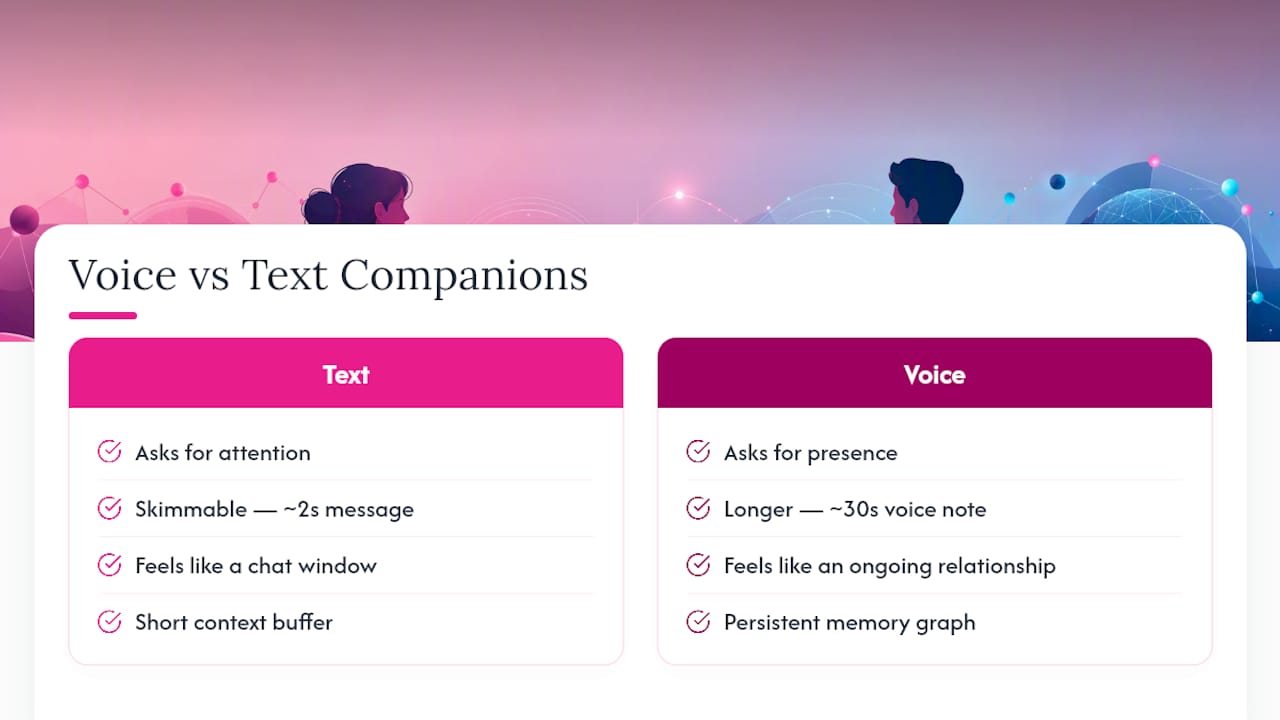
Text-based companions ask for your attention. Voice-based ones ask for your presence, and that distinction changes retention patterns in a real way. A message you can skim in two seconds becomes a 30-second voice note you actually have to sit with, and that shift toward slower, more embodied interaction is a big part of why voice features get added to companion apps in the first place.
Memory is doing more work here than people assume. Kalon’s approach to daily check-ins and tone adaptation reflects a broader pattern: a companion that adjusts its emotional register based on what it remembers about your week feels more like an ongoing relationship than a chat window you reopen. Persistent memory in this context usually means a structured memory graph running above the model’s normal conversation window, not just a longer context buffer. That’s why two apps built on similar underlying models can feel wildly different after a month of use.
Platform investment backs this up at a larger scale. Google reportedly pulled in the team behind Hume AI, a signal that expressive voice technology is becoming a competitive priority well beyond the companion app niche. When major platforms chase lower latency and richer emotional range, the baseline expectation for every companion app rises with it. Apps that still rely on flat, clip-based TTS increasingly sound dated by comparison, and that gap shows up directly in how long people keep the app installed.
Comparing How Leading Voice Companion Platforms Approach the Problem
No two companion platforms build voice the same way, and the differences tend to fall into a few recognizable categories rather than a single spectrum.
Some prioritize call-style streaming, aiming for the feel of an actual phone conversation with interruptible playback and continuous speech recognition. Reverie’s approach to two-way voice calls sits in this category, built around minimizing dead air rather than maximizing voice variety.
Others lean into browser-based accessibility, skipping app downloads entirely. DeepAI’s voice chat runs in-browser and preserves conversational context without requiring installation, which lowers the barrier for someone testing the waters before committing to a subscription.
A third group focuses on memory and voice quality as the headline feature rather than raw speed. Platforms like Vela market premium voice quality (in Vela’s case, built on ElevenLabs) alongside visible memory controls, positioning transparency about what the companion remembers as a trust feature rather than a technical footnote.
None of these approaches is universally better. A streaming-first platform might sacrifice some voice polish for speed, while a memory-first platform might have slightly higher latency but a stronger sense of continuity across weeks of use. The right fit depends on whether you value the phone-call feeling more, or the sense that the companion actually knows you more.
Can Voice Companions Work Inside Apps You Already Use?
Most voice-capable companions still live inside their own dedicated app rather than plugging into your existing messaging stack, and that’s a meaningful limitation if you’re hoping for something that shows up in your regular texting habits.
A few integration patterns are becoming more common. Browser-based tools remove the friction of downloading a separate app, letting you start a voice session from a link. Some platforms offer companion access through smart speakers or home devices, following the same conversational, context-aware direction Google is pushing with Gemini for Home, where the assistant is meant to hold a more natural back-and-forth rather than respond to isolated commands.
True integration with third-party messaging apps like standard SMS or social platforms remains rare. Most companion voice features are designed to keep you inside their own ecosystem, partly for technical reasons (streaming audio needs a stable connection to their servers) and partly because keeping you in-app supports their subscription model. If cross-platform reach matters to you, check specifically whether a companion offers a web link you can share or open on any device, rather than assuming it will show up wherever you already chat.
What Customization Options Exist Beyond Picking a Voice
Voice cloning gets the headlines, but the more useful controls for daily use often sit elsewhere in the settings menu. Tone sliders let you push a companion toward more playful or more calm without changing the voice itself. Some platforms let you set a relationship dynamic or personality profile that shapes word choice and pacing independent of the voice engine.
Response length controls matter more than people expect. A companion that defaults to long, rambling voice notes when you wanted a quick check-in breaks the natural rhythm of a conversation fast. Look for a setting that lets you nudge replies shorter or longer.
Memory controls deserve equal attention. Being able to view, edit, or delete specific memories, not just wipe the whole history, gives you a level of control that voice cloning doesn’t touch. Notification and availability settings, like choosing when a companion can send unprompted voice messages versus only replying when you initiate, also shape how the relationship feels day to day. None of this requires cloning anything. It’s about tuning the personality and behavior around a voice you may not have customized at all.
Where AI Voice Messaging Still Falls Short
Even the best current systems have predictable failure points, and knowing them ahead of time saves you from mistaking a glitch for a dealbreaker.
Emotional mismatches happen often. You’ll ask something serious and get a chipper tone, or mention something exciting and the response comes back oddly flat. This usually traces back to the underlying language model misjudging context, not the voice engine itself.
Latency spikes under load are common during peak hours or with poor connections, even on platforms that advertise fast response pipelines. A companion that felt instant during your demo might lag noticeably at 9 p.m. when server traffic peaks.
Memory drift shows up as a companion “forgetting” something you mentioned recently while somehow recalling a much older detail with perfect accuracy. That’s a sign of how the memory graph prioritizes and prunes information, not a random bug.
Repetitive phrasing creeps in over long-term use, where a companion starts leaning on the same handful of vocal reactions or sentence structures. It’s a limitation of how much variety the voice engine actually has stored, not a sign it’s run out of things to say.
None of these failure modes mean the technology is unusable. They mean you should expect the occasional off note and judge a platform on how often those notes happen, not whether they happen at all.
Does Language or Culture Change How a Voice Companion Sounds?
Prosody, the actual musicality of speech, isn’t universal, and this trips up a surprising number of platforms built primarily for English. A rising intonation that reads as friendly curiosity in American English can land differently in a language where questions are marked grammatically rather than through pitch.
Humor and warmth translate unevenly too. A companion that nails playful sarcasm in English might sound flat or even confusing when the same phrasing gets processed for another language, because the emotional cues embedded in word choice don’t carry over one-to-one. This is part of why Inworld’s evaluation of TTS providers treats emotional expressiveness as something that has to be assessed per language, not assumed to transfer automatically from an English-trained model.
Regional accents and dialects add another layer. A companion voice trained primarily on one accent can sound noticeably artificial to speakers of a different regional variant of the same language, even when the words themselves are correct. If you’re evaluating a companion outside English, or in a dialect that isn’t the platform’s primary training focus, it’s worth running the same emotion and prosody tests from the demo checklist specifically in that language rather than assuming quality carries over from an English demo you saw in a review.
Compare Voice-Capable Companions Before You Commit
Reading spec sheets only gets you so far when the whole point of a voice companion is how it sounds and feels in the moment. Virtualship runs side-by-side comparisons and reviews across dozens of AI companion platforms, with voice quality, latency, memory, and privacy handling documented app by app.

If you’re starting from scratch, the voice chat app roundup is the fastest way to see how different platforms stack up on the tests covered above. Planning to try a companion with custom voice options? The voice-cloning consent checklist walks through exactly what to verify before you record your own voice for cloning. And if cost is the deciding factor, the pricing breakdown shows what voice features actually cost once per-minute or per-character billing gets added to a base subscription.
Run the five-minute demo checklist from this guide against two or three apps from the full comparison page, take notes side by side, and you’ll have a clearer answer than any single review can give you.
Sources
- Best Voice AI for AI Companions (2026)
- AI Voice Chat — Talk to AI With Your Voice
- AI Voice Call – Real-Time Voice Chat with AI Characters | Reverie
- TechCrunch report on Hume AI acquisition/hiring
- Create an AI Girlfriend with Voice, Memory & Vision | Questie AI
FAQ
What Makes a Voice Message From an AI Companion Feel Natural?
Realtime streaming playback, expressive prosody like pitch and pacing changes, and non-verbal cues such as sighs or laughs are the main factors, along with memory that lets the companion reference earlier conversations.
How Fast Should an AI Companion Respond by Voice?
Leading platforms target response pipelines under 300 milliseconds, close to the pace of a real phone conversation; anything with noticeable dead air usually signals clip-based rather than streaming TTS.
Is Voice Cloning Safe to Use With an AI Companion?
It can be, provided the platform requires explicit opt-in consent and offers a clear way to delete the cloned voice later. Virtualship’s voice-cloning checklist covers the specific steps to verify before you record your voice.
Can I Test Voice Quality Before Paying for a Subscription?
Yes. Most platforms offer a free trial or demo message, which is enough to run the greeting, emotion, and interrupt tests covered earlier in this guide.
Why Does My AI Companion Forget Things I Told It Earlier?
This usually comes down to how its memory graph prioritizes and prunes information rather than a simple bug, and it varies significantly between platforms even when they use similar underlying language models.
Where Can I Compare Voice-Capable AI Companion Apps Side by Side?
Virtualship’s voice chat app comparisons and full comparison page break down expressiveness, latency, memory, and pricing across multiple platforms.

