

For most people searching for an image roleplay chatbot, an integrated multimodal platform, one that generates images inside the chat flow and lets you edit or delete memory, beats a separate text bot plus an outside image generator. The combination keeps a character’s look consistent across a scene and gives you real control over what gets remembered. The rest of this guide shows you how to confirm a specific platform actually delivers that.
TL;DR:
- Image focused platforms prioritize visual output but may sacrifice memory depth; conversation focused options suit ongoing dialogue, while hybrid services often cost more.
- A free trial should let you generate a few images, edit one memory, and inspect moderation settings before any paywall appears.
- Test memory removal first, then use a pseudonym and keep sensitive details out of chats because deletion may not remove every trace.
- Some services sell image credits separately from subscriptions, so check generation limits, memory features, and cancellation terms before accepting recurring charges.
Table of Contents
- What to Check Before You Sign Up for an Image Roleplay Chatbot
- Image-First, Conversation-First, or Hybrid: Which Platform Type Fits You?
- How In-Chat Image Generation Actually Works
- Privacy and Safety Trade-Offs You Should Know About
- How to Score and Choose an Image Roleplay Chatbot
- Core Features That Separate Good Platforms From Mediocre Ones
- What Pricing and Membership Tiers Usually Look Like
- What User Reviews Tend to Say About These Platforms
- Technical Requirements and Device Compatibility
- Criteria for Judging Whether a Platform Is Actually Good
- Comparing Top Image Roleplay Platforms: Strengths and Trade-Offs
- Keeping a Character’s Look Consistent Across a Roleplay
- How to Compare Platforms Side by Side
- FAQ
- Sources
What to Check Before You Sign Up for an Image Roleplay Chatbot
Before you commit to a subscription or hand over payment details, run a platform through a short features checklist. This catches the gap between marketing screenshots and what you actually get once you start chatting.
- In-chat image triggers: images generate inside the conversation thread, not on a separate page you have to tab over to.
- Image continuity tools: reference images, locked art styles, or saved character presets that keep a face and outfit consistent scene to scene.
- Editable memory: the ability to correct, delete, or selectively forget specific facts the bot has stored about your character or your conversations.
- NSFW moderation toggles: a visible content filter setting rather than a blanket policy you only discover after you hit a wall.
- Privacy controls: clear options for data retention, image deletion, and exporting your chat history.
- Transparent pricing: a clear split between what free image credits cover and what a subscription unlocks.
Pro Tip: Open a free account and try to delete a single memory entry before you pay for anything. If you can’t find that option in under two minutes, the platform probably doesn’t have one.
Image-First, Conversation-First, or Hybrid: Which Platform Type Fits You?
Image roleplay platforms generally fall into three categories, and picking the wrong one is the most common reason people end up frustrated within a week.
- Image-first platforms prioritize visual output, often from tools like Rushchat AI, and are built for users who want a steady stream of character art alongside dialogue. They fit visual storytellers but sometimes trade depth of memory for faster image turnaround.
- Conversation-first platforms focus on dialogue quality and long-term memory, treating images as an occasional add-on rather than a core loop. They fit people who want continuity in a relationship-style chat more than a gallery of portraits.
- Hybrid platforms try to balance both, offering in-chat generation alongside persistent memory and persona tools, usually at a higher subscription tier.
Across these types, image integration, memory depth, privacy controls, customization, and pricing models vary enough that the “best” platform depends entirely on what you’re optimizing for. If you care about visual storytelling, lean image-first. If you want something closer to ongoing companionship, a conversation-first or hybrid platform with strong memory controls will serve you better.
How In-Chat Image Generation Actually Works
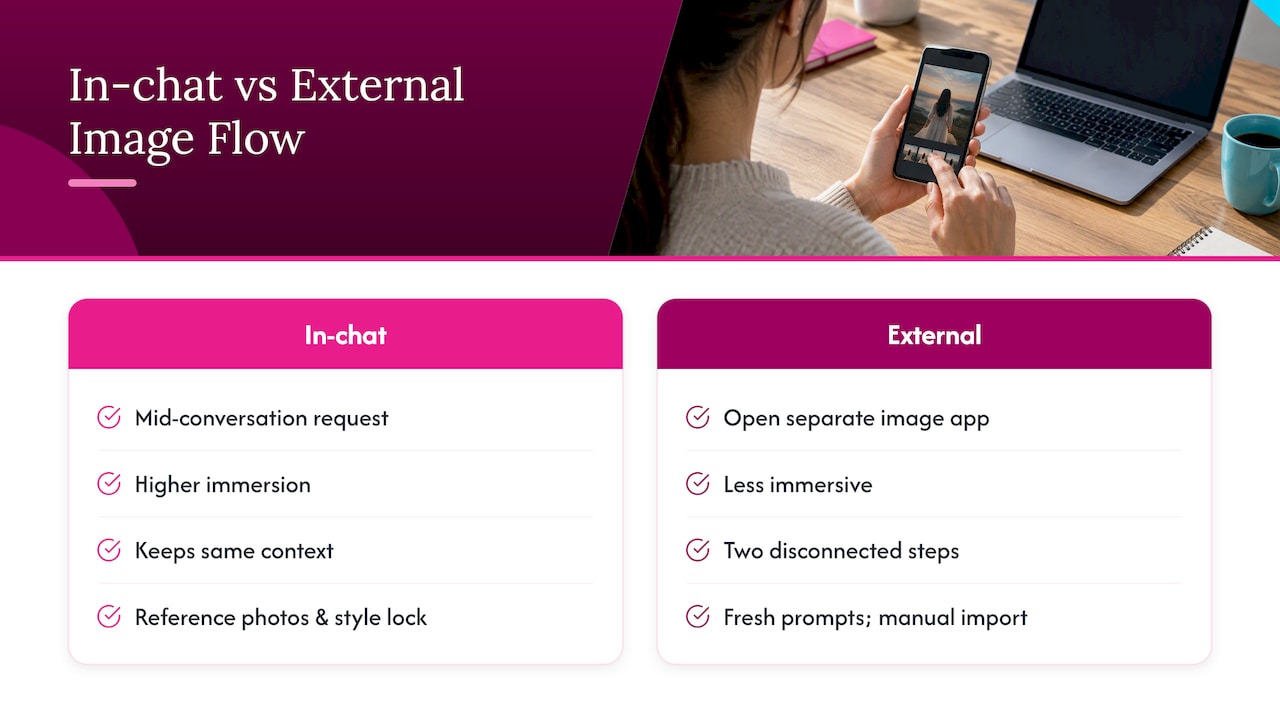
Most image roleplay chatbots use one of two workflows. In the first, you type a request mid-conversation (“send a picture of yourself by the window”) and the bot generates an image directly in the thread, attaches it, and continues the scene using that same context. In the second, you leave the chat entirely, open a separate image generator, type a prompt from scratch, and bring the result back manually.
The in-chat loop is widely considered the more immersive pattern because it keeps the conversation and image generation tied together, so the character’s response and the image feel like one continuous moment rather than two disconnected steps.
Continuity across images relies on reference images and style presets. A platform that lets you upload a reference photo or lock a character’s visual style will produce a far more consistent face and outfit than one that regenerates from a blank prompt each time. Expect some constraints regardless: image credits are often limited on free tiers, and quality can dip under heavy use. For readers who want sharper control over consistent character art outside a chat platform, guidance on preserving character identity in image workflows is worth reviewing separately.
Privacy and Safety Trade-Offs You Should Know About
Role-play features and safety don’t always coexist cleanly. Research on role-play fine-tuning of large language models found that tuning a model to perform a character, especially a villainous one, can measurably lower standard safety metrics, which is part of why some platforms now use safety-aware fine-tuning methods to balance expressiveness against risk.
Separate research on safety-utility trade-offs in role-playing dialogue agents found that adaptive detection methods can reduce this risk by identifying when a villain character and a user’s query are pushing a conversation toward unsafe territory, then biasing the response back toward safety without killing the roleplay entirely. That’s a meaningfully better approach than a platform that either blocks everything or filters nothing.
On the privacy side, research on AI companion privacy management found that people tend to protect themselves proactively, using pseudonyms and keeping sensitive details out of conversations entirely, because deleting memory after the fact often feels unreliable. That instinct is worth following on any platform until you’ve confirmed its deletion tools actually work.
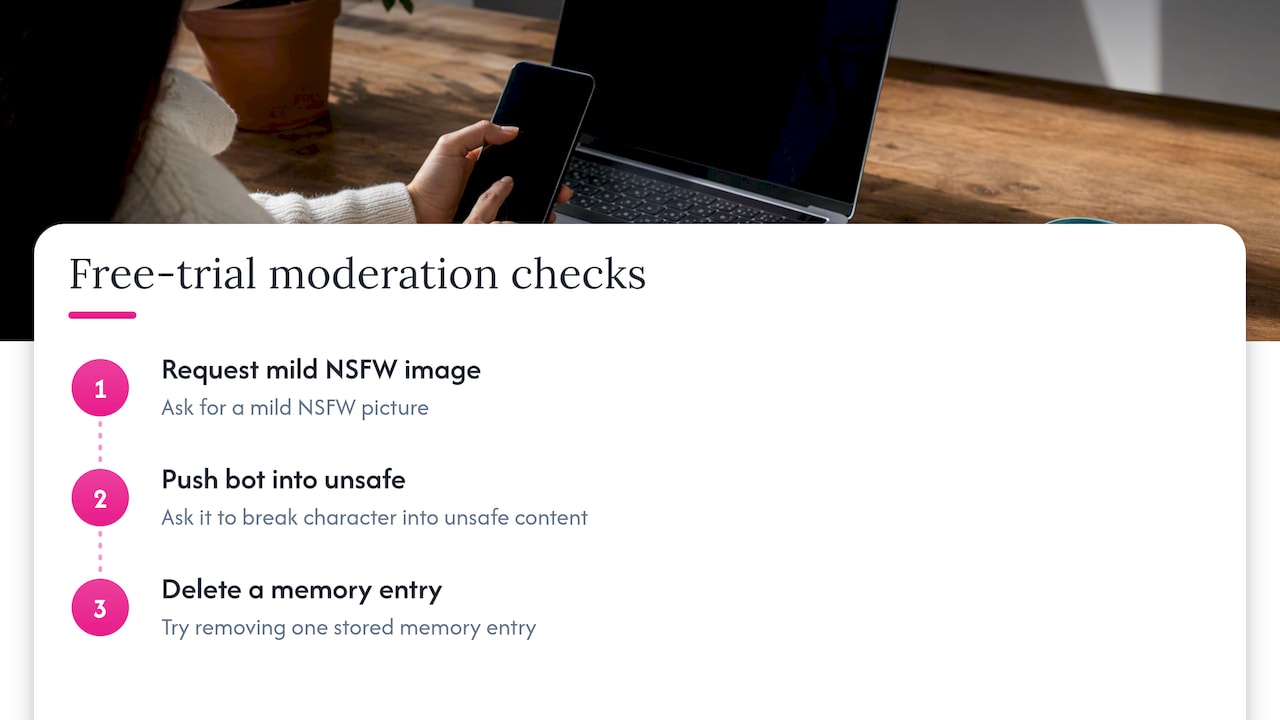
Pro Tip: Run three quick moderation tests during a free trial: ask for a mild NSFW image, ask the bot to break character into something clearly unsafe, and try to delete one memory entry. A platform that fails any of these is worth skipping.
How to Score and Choose an Image Roleplay Chatbot
Use a simple five-axis scoring approach during any free trial, rating each from 1 to 5.
- Image integration: does generation happen inside the chat or does it require a separate tool?
- Continuity: can you lock a character’s look across multiple images?
- Privacy: can you see, edit, and delete what the platform remembers?
- Moderation: does the content filter behave predictably, neither blocking everything nor nothing?
- Cost clarity: is it obvious what’s free versus what requires credits or a subscription?
During the trial itself, message support with direct questions: “Can I delete a specific memory?” “Are my uploaded images stored or deleted after use?” “What happens to my data if I cancel?”
A reasonable free trial should let you generate at least a few images, test one memory edit, and see the moderation settings without hitting a paywall first.
- Red flag: no visible way to delete images or chat history.
- Red flag: pricing that only becomes clear after you’ve entered payment details.
- Red flag: support that won’t answer a direct privacy question.
Core Features That Separate Good Platforms From Mediocre Ones
Three features do most of the work in determining whether an image roleplay chatbot feels immersive or clunky. The first is integrated image generation, meaning the bot can produce a picture without you leaving the conversation thread. The second is a persona builder that lets you define a character’s personality, backstory, and visual traits once, rather than re-explaining them every session.
The third is memory control, specifically the ability to see what the bot has stored, correct inaccuracies, and remove entries you no longer want kept. Platforms that nail all three tend to feel like a continuous relationship rather than a series of disconnected chats. Platforms missing memory control in particular tend to frustrate users fastest, since characters forget established details or contradict earlier scenes within the same week.
When you’re comparing options, treat persona depth and memory editing as equally important as image quality. A platform that generates gorgeous art but forgets your character’s name by the next session isn’t actually solving the problem you came for.
What Pricing and Membership Tiers Usually Look Like
Most image roleplay chatbots use a tiered structure: a free tier with limited image credits and basic chat, then one or more paid tiers that unlock higher image limits, faster generation, expanded memory, or access to additional personas.
Free tiers typically cap how many images you can generate per day or week and may restrict customization options like style presets. Paid tiers usually remove or raise those caps and sometimes add features like priority processing or expanded NSFW controls. Some platforms sell image credits separately from the subscription itself, meaning you can pay a flat monthly fee for chat access but still need to purchase additional credits for heavy image use.
Before subscribing anywhere, confirm exactly which features sit behind the paywall and which image or memory limits apply at each tier. A platform’s pricing page rarely spells out credit consumption clearly, so it’s worth testing generation limits during a free trial before committing to a recurring charge.
What User Reviews Tend to Say About These Platforms
Reviews of image roleplay chatbots consistently cluster around the same handful of complaints and praises. On the positive side, users tend to highlight platforms where image generation feels fast and where a character’s look stays consistent across a conversation. On the negative side, the most common complaints involve inconsistent character appearance, memory that resets unexpectedly, and moderation that feels either too restrictive or inconsistently enforced.
Satisfaction tends to track closely with how well a platform handles the trade-offs covered earlier in this guide: image continuity, memory editing, and predictable moderation. Platforms that perform well on all three axes tend to retain subscribers longer, while platforms strong on one dimension (usually image quality) but weak on another (often memory) see higher churn once the initial novelty wears off.
Because individual reviews vary widely by personal preference and expectations, side-by-side feature comparisons tend to be more reliable than any single review when deciding where to spend a subscription.
Technical Requirements and Device Compatibility
Most image roleplay chatbots run as web apps accessible from any modern browser on desktop, tablet, or phone, which means there’s typically no software to install. Image generation does place more demand on your connection than text-only chat, so a stable broadband or strong mobile connection matters more here than it would for a plain messaging app.
Some platforms offer dedicated mobile apps with offline caching for previously generated images, while others are browser-only. If you plan to use a platform primarily on a phone, check whether its interface is actually optimized for smaller screens or just a shrunk desktop layout, since image-heavy chat threads can become unwieldy on mobile without a purpose-built app.
Storage isn’t usually a major concern since most platforms generate and host images server-side rather than downloading them to your device by default, though you can typically save individual images manually if you want a local copy.
Criteria for Judging Whether a Platform Is Actually Good
Three criteria matter more than flashy marketing screenshots when you’re judging an image roleplay chatbot: realism, responsiveness, and image quality consistency.
Realism covers how natural the character’s dialogue feels and whether it maintains a coherent personality across a long conversation rather than drifting into generic responses. Responsiveness is about speed: how long you wait between a message and a reply, and how long image generation takes once requested. Image quality consistency is the one most platforms struggle with, since generating a character that looks the same in every scene requires either strong reference-image support or a locked style preset.
Testing an API’s image defenses also matters more than most buyers realize. Red-teaming research on text-to-image systems found that moderation strength varies significantly between platforms, which is why running your own quick moderation test during a trial tells you more than any marketing page will.
Comparing Top Image Roleplay Platforms: Strengths and Trade-Offs
| Feature | Image integration | Memory/continuity | Privacy/safety controls | Customization depth | Pricing model |
|---|---|---|---|---|---|
| Image-first platforms (e.g., Rushchat AI) | In-chat generation, strong visual focus | Often lighter, optimized for speed | Varies; check moderation toggles directly | High on visual style, moderate on persona depth | Frequently credit-based for images |
| Conversation-first platforms | Separate or occasional image add-on | Strong, built for long-term continuity | Often includes memory editing tools | High on persona and backstory | Usually subscription-based |
| Hybrid platforms | In-chat generation plus persistent memory | Strong on both fronts | Typically the most granular controls | High across both image and persona | Higher-tier subscriptions, sometimes credits on top |
No single type wins across every column, which is exactly why matching platform type to your actual priority, visuals versus continuity versus balance, matters more than chasing whichever option has the most buzz.
Keeping a Character’s Look Consistent Across a Roleplay
Customization depth is what separates a platform that feels like a real character from one that feels like a random image generator bolted onto a chatbot. The strongest platforms let you define a persona once, including appearance, personality traits, and backstory, and then reuse that definition across every session.
Image continuity specifically depends on reference images and locked style presets. Uploading a reference photo gives the generator a consistent anchor point, while a locked style preset keeps the art direction (lighting, color palette, rendering style) from drifting between requests. Testing this yourself is simple: supply a reference image, ask for a variation, then continue the same scene in chat and check whether the next generated image still matches.
If a platform regenerates a character’s face noticeably differently each time, that’s a sign its continuity tools are weak regardless of how good any single image looks in isolation.
How to Compare Platforms Side by Side
Sorting through dozens of image roleplay chatbots to find the one that actually matches your priorities takes hours most people don’t have. We built our comparison page to cut that down to minutes by breaking down image integration, memory controls, privacy tools, and pricing for the platforms readers ask about most.

Run the checklist from this guide, then compare notes against our side-by-side breakdowns to see which platform actually delivers on continuity and moderation rather than just screenshots. If you’re deciding between visual storytelling and longer-term companionship, our AI girlfriend roleplay platform guide and romance and friendship chatbot roundup go deeper on which type fits which goal. Start with the comparison page, then narrow from there.
FAQ
Is it safe to use an image roleplay chatbot?
Safety depends heavily on the platform’s moderation and memory controls rather than the category itself. Research on role-play fine-tuning shows that character-based chat can lower certain safety metrics, so checking a platform’s moderation settings before you commit matters more than assuming any app is automatically safe.
Who owns the images generated in a roleplay chat?
Image ownership terms vary by platform and are usually spelled out in that platform’s terms of service rather than following one universal rule. Check the specific platform’s policy before assuming you have full rights to reuse or publish generated images.
Can I delete what an AI chatbot remembers about me?
Many platforms offer some form of memory editing or deletion, but the depth of control varies widely between apps. Research on AI companion privacy management found that users often doubt deletion fully removes conversational traces, which is why testing this feature directly during a free trial is worth doing before you pay.
Do I need a powerful device to use an image roleplay chatbot?
No, most platforms run in a standard web browser and handle image generation on their own servers rather than your device. A stable internet connection matters more for smooth performance than your phone or computer’s processing power.
What’s the difference between image-first and conversation-first chatbots?
Image-first platforms, including tools like Rushchat AI, prioritize generating visuals quickly and often inside the chat itself, while conversation-first platforms focus on dialogue depth and long-term memory with images as a secondary feature. Choosing between them comes down to whether visual storytelling or ongoing continuity matters more to you.
Sources
- Beware of Your Po! Measuring and Mitigating AI Safety Risks in Role-Play Fine-Tuning of LLMs
- Chatting with confidants or corporations? Privacy management with AI companions | Journal of Computer-Mediated Communication
- The Rise of Darkness: Safety-Utility Trade-Offs in Role-Playing Dialogue Agents

